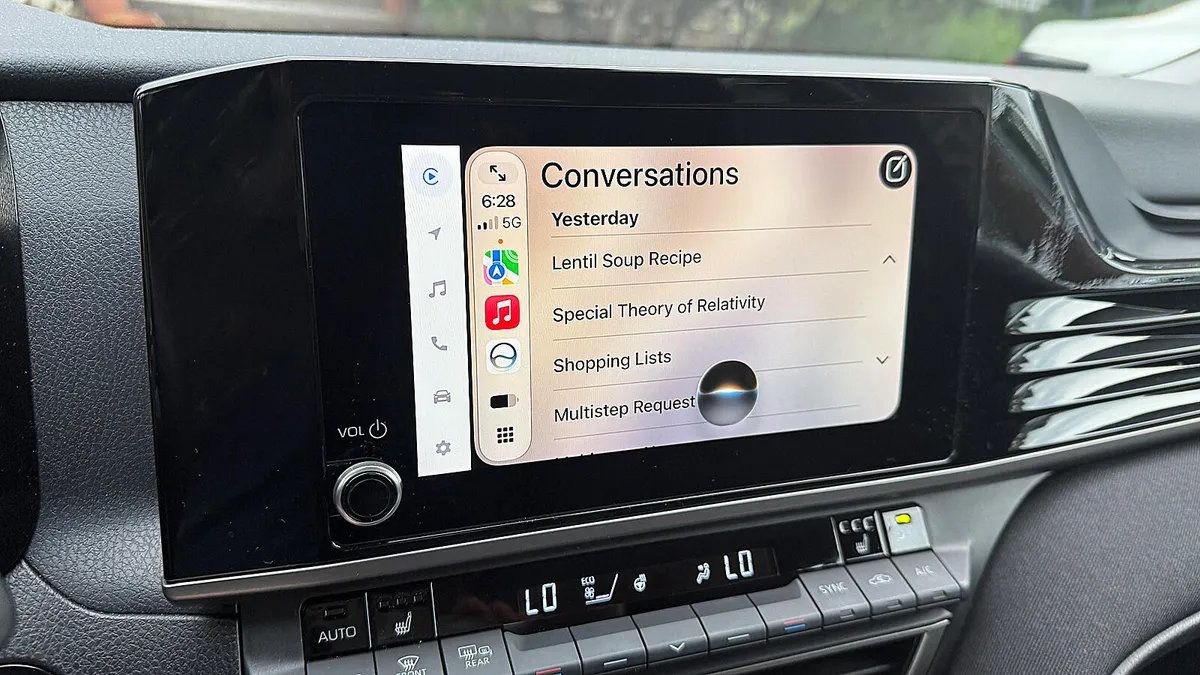
I tested iOS 26 Siri against iOS 27 Siri AI in my car – and it wasn’t even close

Follow ZDNET: Add us as a preferred source on Google.
As an iPhone user, I often get frustrated with Siri’s inability to correctly respond to my questions and requests. That’s especially true in the car when I’m driving. And when it fails to respond or gives me the wrong answer, that’s a distraction I don’t need when I’m behind the wheel.
That’s why I’ve been looking forward to the new Siri AI, due to officially roll out in September with iOS 27. This latest generation of the voice assistant promises to be more responsive, more accurate, and less frustrating.
Also: How to get a tax-free Mac, iPad, or iPhone in 8 states – but only on these dates
Does Siri AI live up to the hype? To answer that question, I recently took two iPhones with me in the car — one with iOS 26 and the other with the iOS 27 public beta. I tasked both of them with the same questions and requests to see if and how the new Siri bested the current flavor. Here’s what happened.
Requirements
If you want to try out the new Siri as well, here’s what you’ll need.
First, you have to grab the iOS 27 public beta. Beyond being compatible with this version of the OS, your phone must also support Apple Intelligence and Siri AI. That means you need an iPhone 15 Pro, iPhone 15 Pro Max, any iPhone 16 model, or any iPhone 17 model. Since even the first public beta could be unstable, avoid installing it on your primary phone. Instead, use a spare or test iPhone. I’m using a spare iPhone 15 Pro.
Second, you need access to Siri AI. With the developer beta of iOS 27, you had to join a waitlist and be patient. With the public beta, there’s no more waitlist, so you can dive right in.
Also: 5 underrated iOS 27 features that make my iPhone way better – and none are Siri AI
Third, your iPhone must be connected and set up in your car through Apple CarPlay. The specific steps can vary slightly based on the make of your vehicle. But this Apple support article should help you with the process if you’re not already set up.
TL;DR
To cut to the chase, how did Siri AI and regular Siri compare and contrast with each other? When I gave them simple requests such as asking for driving directions to a specific address, texting or calling someone, checking my calendar, and adding a reminder, they both fared about the same. But when I ramped up the challenge by posing more complex questions, Siri AI then proved its worth.
Now, here are some of the questions and requests I gave to both versions of Siri, and how each responded.
For this test, I asked Siri to give me directions to a doctor listed among my contacts. I simply told it to take me to Dr. [person’s last name]. Regular Siri didn’t even seem to consult my contacts and instead gave me a list of doctors on the web, none of whom matched the right one.
In contrast, Siri AI clearly scanned my contacts and immediately gave me directions to the correct doctor.
Winner: Siri AI
Here, I asked Siri for driving directions. Both regular Siri and Siri AI complied with my request. But then I started a new conversation and asked each to avoid toll roads. Siri AI changed the existing directions based on my new request. But regular Siri just gave me generic information on how to avoid toll roads.
This test was less about driving directions and more about Siri’s ability to connect a new conversation or request to a previous one.
Winner: Siri AI
Both regular Siri and Siri AI were able to find local restaurants based on specific cuisines. But they differed in their responses to follow-up questions. After each displayed the list of restaurants I requested, I asked both to give me the ratings and reviews for each one.
Siri had trouble with this request as it sometimes described a different set of restaurants based on their reviews. But Siri AI nailed this each time by providing the requested details for the restaurants on the screen.
Winner: Siri AI
For this test, I asked both editions of Siri to tell me something interesting about the town I was driving through. Regular Siri told me I could search the web for that when I finished driving. In contrast, Siri AI served up some interesting facts about the current town.
Winner: Siri AI
For this one, I asked both flavors of Siri to play some Beatles music. By default, regular Siri tuned up the Beatles channel on Sirius XM even though I didn’t specify that as the source. I even asked it to play Beatles songs from my own music library, and still it turned to Sirius XM. When I asked Siri AI to play Beatles music, it automatically grabbed the tunes from my library.
Winner: Siri AI
Siri AI is designed to respond to multi-part requests, a more complex type of task that regular Siri can’t handle. This means you can bundle several tasks in one shot.
Here, I asked it to find a recipe for lentil soup on the internet, create a shopping list of the ingredients, and text me the list. It followed each step correctly, ending with the list of items texted to me.
Winner: Siri AI
Both versions of Siri can provide certain kinds of general information. But Siri AI is better equipped for the task. Depending on the question, regular Siri may simply give up, tell you to check the web later when you’re not driving, or turn over the job to ChatGPT. In contrast, Siri AI was able to answer all the questions I threw at it, and more adeptly.
As one example, I asked both flavors of Siri to explain Einstein’s special theory of relativity. Regular Siri provided a brief answer grabbed from a single source on the web. Siri AI served up more details pulled from several different web sources and organized them all into one cohesive explanation. It then suggested a couple of sub-topics and asked me which one I’d like to explore.
Winner: Siri AI
I asked both flavors of Siri to tell me a story. When I didn’t specify the topic, both told me a brief tale, though the one from Siri AI was more clever and creative. Then I specified a topic, asking each to tell me a story about my cat, Mr. Giggles, traveling to the moon.
Regular Siri told me it couldn’t do that while I was in the car and that I’d have to do it on my iPhone. Siri AI kicked off an entertaining story about my favorite cat.
Winner: Siri AI
Here, I asked each version of Siri to play a game. Regular Siri told me I’d have to open an app for that. Siri AI was ready to challenge me with a game, though its options were limited to flipping a coin, drawing a card, rolling some dice, or playing Rock, Paper, and Scissors. When I asked it to play a trivia game about American history, it told me it couldn’t do that.
This does point out a key aspect of Siri AI. It’s purposely designed to be less entertaining and more serious than other AIs such as ChatGPT and Gemini. That’s not a bad thing, but I would like to see it develop a bit of a playful side as well.
Winner: Siri AI
Finally, I asked Siri to teach me a language. Regular Siri said it could search the web for that when I’ve finished driving. Siri AI asked me what language I wanted to learn, and I mentioned Italian. It then offered me basic, conversational phrases in both Italian and English, explained what each one meant, and continued the lesson by giving me more words and phrases.
Winner: Siri AI
The results
Siri AI clearly was the winner, at least when it came to more complex and nuanced tasks. Did it score each time? No, not quite.
Sometimes it didn’t let me finish my end of the conversation, especially when I was trying to give it a multi-part request. Other times it would simply fail to respond and then time out. But as Siri AI is still in beta mode at this point, it’s naturally going to have some rough edges. Hopefully, the new Siri will be fine-tuned by the time it makes its official debut in September.