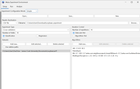
WEKA Experimenter – Can’t select J48 as the baseline classifier in Analyse tab
 |
Hi everyone, I'm a university student using WEKA Experimenter for an assignment, and I've run into an issue that I can't figure out. According to my practical instructions, after running the experiment, I should:
However, when I click Select, I only see two options:
There are no classifiers (J48, NaiveBayes, IBk, etc.) available to choose. At the same time, the Test output shows these errors: My lecturer thinks the experiment may not have completed successfully, but I have already run it to completion. Has anyone experienced this issue before?
I'm using WEKA 3.8.7. Any suggestions would be greatly appreciated. Thanks! submitted by /u/etervn |