Google’s newest sign-in method asks you to look at the camera
Google’s selfie video sign-in option verifies that an account owner is a real person and that the account wasn’t created or used by computer programs or bots for the purpose of abuse, such as spamming. It is not available for all regions, accounts, or devices.
Source: Google
A selfie video is recorded and securely stored with the account owner’s consent, and it can be deleted at any time in the Google Account. Users may take a selfie video to access additional services, features, or for other purposes, and give the company permission to use it to develop and improve facial recognition, age estimation, and other verification methods that may use physical features or movement. Permission can be revoked at any time.
“It’s used only for helping you sign in, unless you opt to share it for additional purposes. Your selfie video is encrypted at rest, meaning it’s securely stored even when it’s not being used,” John Gronberg, Director of Product Management, and Claire Forszt, Product Manager, Google Identity and Engagement, explained.
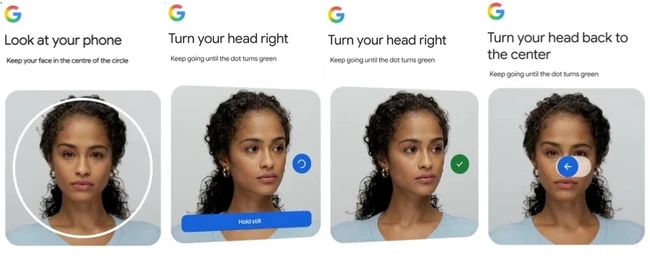
When this option is used to sign in, Google matches it with the saved selfie video and requires users to perform movements to prove it is a live video, helping prevent impersonation attempts using fake photos or videos.
Users can delete their selfie video from the Google Account at any time if they change their mind. It will be deleted from the account after a period of time, although users may lose access to certain advanced features.
Google says it may retain selfie videos for longer if a user violates its policies, using the videos to investigate violations and enforce its rules.
Setting up selfie video
Users verify their identity by taking a selfie on a mobile device connected to Wi-Fi. After tapping Continue, they follow the on-screen instructions before centering their face in the camera. Unlocking access may take a few seconds. Once complete, access is restored, although some users may need to return to the service manually if they are not redirected automatically.
The company recommends keeping the eyes, nose, and mouth clearly visible during the selfie, removing sunglasses, masks, and hats, and making sure no other people or images of faces appear in the background.