I tried running a local LLM on a Raspberry Pi, and the results were hilarious
It’s a classic question in the world of electronic devices: can it run Doom? For a Raspberry Pi 3B+, the answer is a resounding yes. Doom is now more than 30 years old, so a more pertinent question is: can it run a local LLM? I took an LLM for a spin on a Raspberry Pi to see what was possible.
A Raspberry Pi 3B+ isn’t really enough to run an LLM
1 GB of RAM is too little for most models

When it comes to running local LLMs, RAM is vital. Your computer loads the model into RAM when it’s running, so if you have a limited amount of RAM, you’re severely restricted on the size of the models that you can run.
A small LLM with 1B parameters can require more than 2 GB of RAM at full 16-bit precision, although quantized versions can reduce the memory requirement significantly. This is a big problem, because I’m testing this out with a Raspberry Pi 3B+, which only has 1 GB of RAM. Even some Raspberry Pi 5 models only have 1 GB of RAM, so using a Pi model from 2018 isn’t as crazy as it sounds.
The problem is that even if a model could fit into 1 GB of RAM, in practice, some of the Raspberry Pi’s RAM is used for the minimal Linux OS and background services. There may be as little as 600MB of RAM available for the model. Even a model with 0.5 B parameters was going to be a tight squeeze.

- Brand
-
Raspberry Pi
- Storage
-
8GB
It’s only recommended for tech-savvy users, but the Raspberry Pi 5 is a tinkerer’s dream. Cheap, highly customizable, and with great onboard specs, it’s a solid base for your next mini PC.
Some tiny models might be able to run
A Microsoft model seemed like it had the best chance

While even most small LLMs require more than 600MB of RAM, there are some incredibly small models that are designed to run on devices with minimal amounts of RAM and that are lacking dedicated GPUs.
Qwen2.5 0.5B was a possible candidate. At only 0.5B parameters, it was just about small enough to fit on my Raspberry Pi. The problem with using such a small model, however, is that its capabilities would be severely limited compared with larger models.
I then considered BitNet b1.58 2B4T, a 1-bit LLM from Microsoft Research with around 2.4B parameters. It’s designed to be extremely memory-efficient, giving it a much smaller memory footprint than conventional models of a similar size. At first glance, it looked like the best option, but in practice, it involved using Microsoft’s specialized bitnet.cpp framework, which I wasn’t convinced I could build on my Raspberry Pi 3B+.
In the end, I fell back to a heavily quantized version of TinyLlama 1.1B. Although it had more parameters than Qwen2.5 0.5B, the model file should be small enough to run on my Raspberry Pi.
To make life easier on the tiny amount of RAM, I set up 2 GB of swap, so the operating system had somewhere to offload memory when RAM filled up. This uses the SD card as spillover; if the Pi runs out of RAM, instead of crashing, the OS can move some less-active data from RAM to the SD card, freeing up physical RAM for whatever it needs to process next.
The downside is that writing to the SD card is much slower than writing to RAM, so heavy swap makes things get very slow. I hope it would allow the LLM to keep running, even if it slowed to a crawl.
Running the model in llama.cpp
I didn’t have RAM to spare for Ollama’s convenience

I run most of my local LLMs in Ollama. Ollama is an LLM platform that makes it easy to fetch and manage models. The problem is that Ollama would use up some of my precious RAM.
Ollama is built on llama.cpp, while adding tools for downloading, configuring, and managing models. By running the model directly in llama.cpp, I could avoid some of that additional overhead.
Compiling llama.cpp on my aging Raspberry Pi was the slowest part of the entire process. It took more than two hours to build. Eventually, however, I had everything in place to start running local models.
I downloaded the TinyLlama-1.1B-Chat-v1.0 model onto the Raspberry Pi. It’s a quantized version of TinyLlama, which would be more than 2 GB in its original 16-bit form. The quantized model was just 637 MB. Quantization can reduce accuracy, so I was interested to see how well it could perform.
Running an LLM on my Raspberry Pi was hilarious
Some responses were pure genius
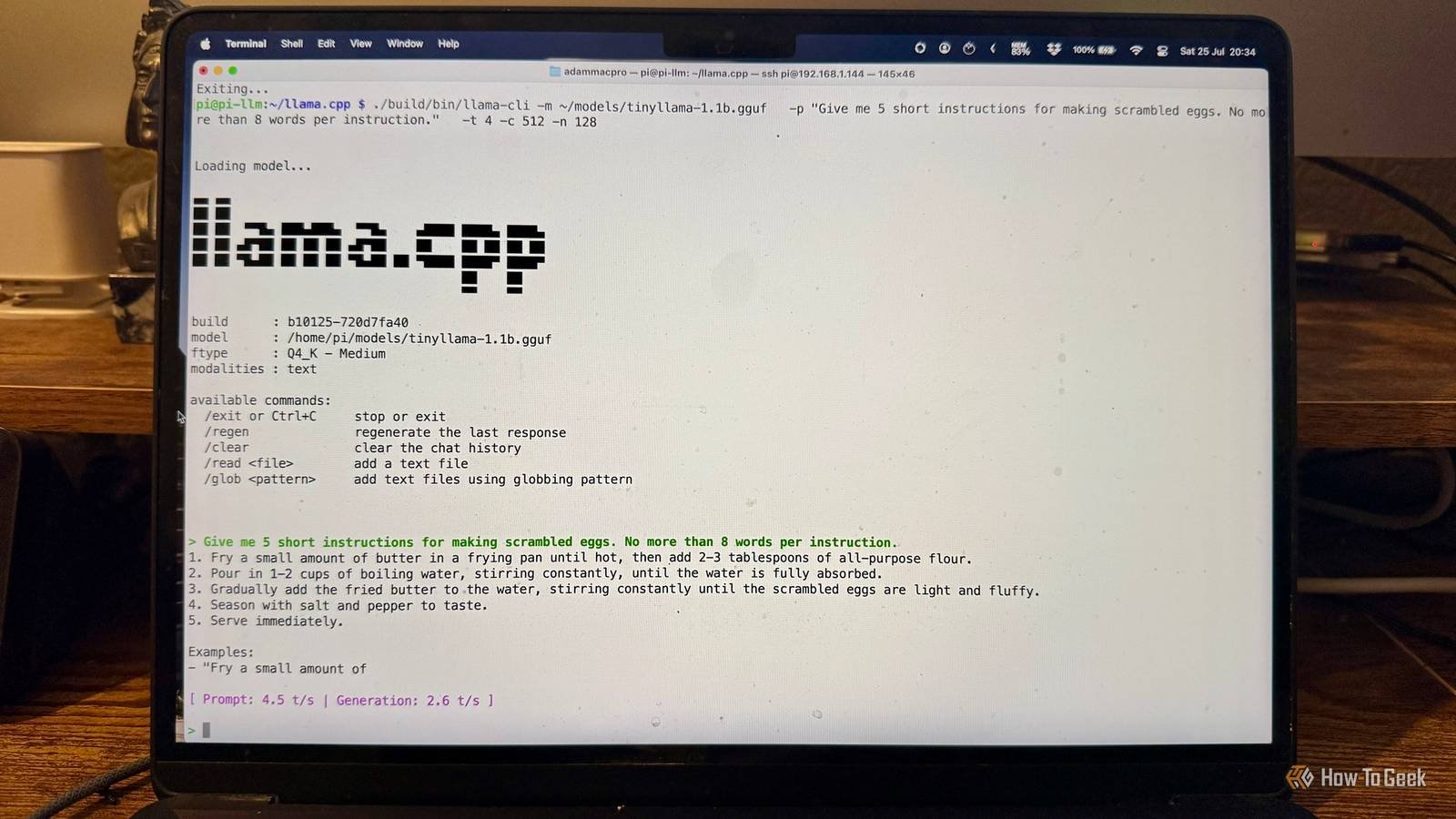
When I gave the LLM its first prompt, I was genuinely impressed at the speed of the response, which was much faster than the complete crawl I was expecting. The prompt was processed at 4.5 tokens per second, and the response was generated at 2.9 tokens per second, which equates to about two words per second. Then I started to read the response.
My first prompt asked the LLM to explain what a Raspberry Pi is in two sentences. It got as far as “A Raspberry Pi is a type of electronic gadget” before things started to fall apart. Apparently, a Raspberry Pi incorporates the concept of a Prydery Pi, a type of logic circuit that is used to create a pydery effect. It also produces an audible noise and vibration when touched; well, don’t we all?
Further prompts were equally hilarious. According to the LLM, the Eiffel Tower is also known as the “Love at First Sight Tower,” How-To Geek is an online resource for home improvement enthusiasts, and the word “strawberry” consists of only two letters: R and B.
While the LLM could give some accurate answers, such as that the capital of France is Paris, and that a famous Paris landmark is the Eiffel Tower, it would always completely make up at least one part of the response. The recipe for scrambled eggs that didn’t actually include any eggs was an interesting take. The ultimate outcome was that while a Raspberry Pi can get an LLM to generate text, the content of that text is mostly nonsense.
A Raspberry Pi can run an LLM, it just probably shouldn’t
This experiment was just a bit of fun, but it did show that it is possible to run an LLM even on a device as underpowered as a Raspberry Pi 3B+. To paraphrase Jeff Goldblum: just because you can doesn’t mean that you should.




![I implemented the YOLO26n model inference from scratch using ARM64 Assembly Language (No framework) [P]](https://jobssz.com/wp-content/uploads/2026/07/wiyelkfpsifh1.jpeg)