This Samsung app is the automation hub Google Home wishes it could be
Finding an automation app that fits my thinking style has been difficult. Many apps require familiarity with automation and certain syntax to create helpful flows. Meanwhile, more accessible options can be extremely limited in their functionality or require a subscription to unlock multiple automations.
However, in my adventures with automation apps, from Home Assistant to Google Home, Samsung’s Modes and Routines stands out as a powerfully simple automation hub that other software companies could learn from.
Samsung’s routine templates make automation easy
Even beginners can figure it out

I think that everyone could benefit from automation in their lives to some extent. It doesn’t have to involve an army of smart home devices or complex flows; rather, it’s about automated tasks built right into your smartphone. Few apps accomplish this as effectively as Samsung Modes and Routines.
The app really came into its own over the past few years, making it one of those lesser-known Samsung apps that I wish I’d used sooner. It introduced preset routines with everyday triggers, like weather or clock actions. If you’re like me and sometimes struggle to decide where to start with automation apps, these templates are incredibly helpful. I actually stumbled across the app after its One UI 8 update, since I was specifically looking for weather automation that other apps were struggling to provide due to changes in weather data APIs.
That’s when I realized just how much you can do with the app. You can select one of the templates, such as Never miss important calls or Save battery at night, and adjust the triggers and actions to suit your needs.
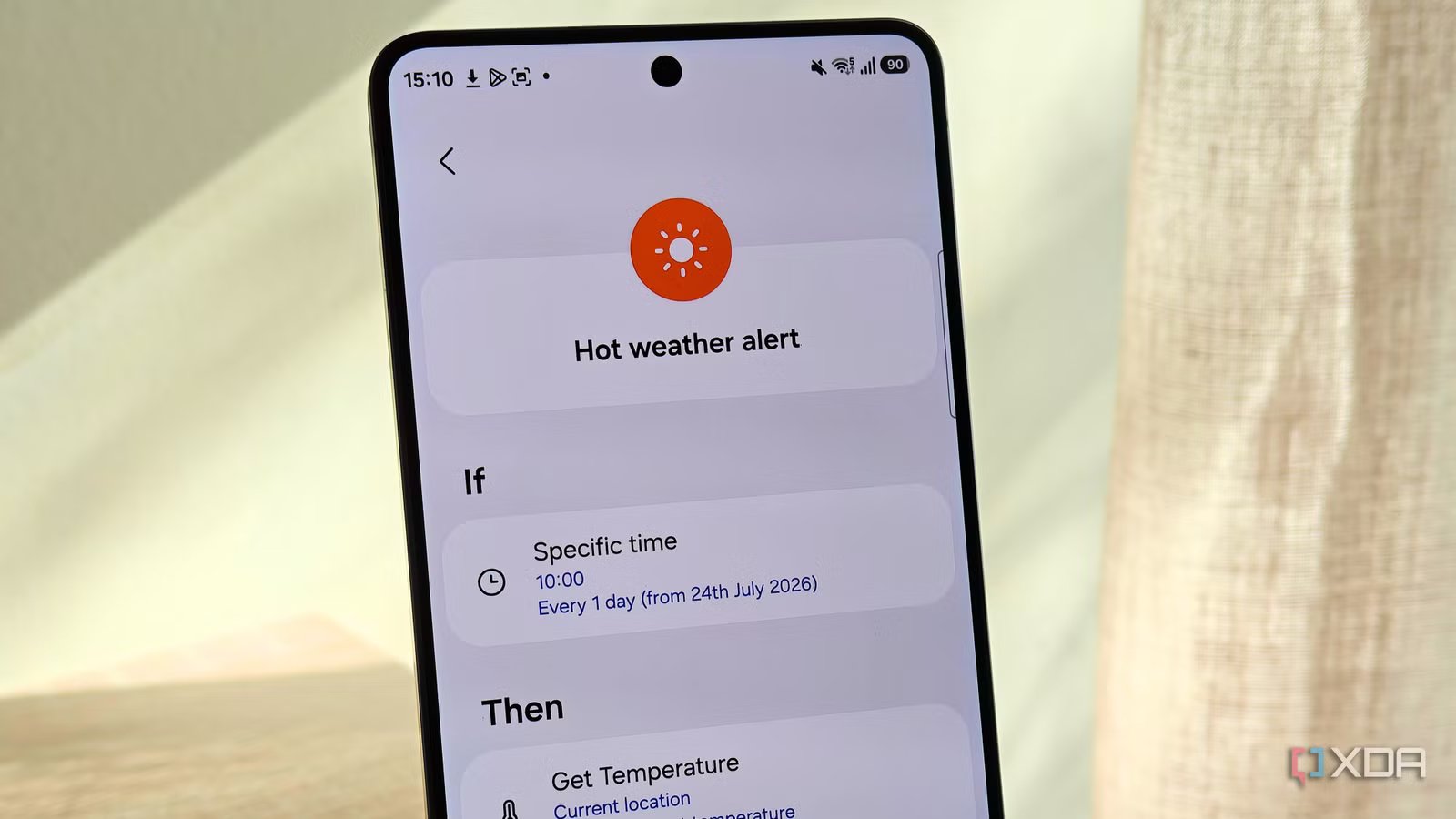
This is how I set up my hot weather notification. I chose the template for cold weather warnings, changed the temperature trigger, and changed the action to send a custom notification. This means my Samsung Galaxy device warns me when the temperature is likely to exceed a certain threshold, since this is a risk factor for my migraines.
The Discover tab helps you figure out what’s possible with your device’s automations. You can set apps to open at certain times or locations, auto-rotate your screen when you’re watching videos, get exercise encouragement, and more. Modes also allow you to adapt your device settings for specific tasks, such as when you’re asleep or at work.
Creating an automation from scratch is relatively easy
Ingredients are sorted into helpful categories

If you don’t find anything that matches the automation you want to create, you can also create one from scratch using the plus icon in the Routines tab. The UI is simple and minimalistic, not overwhelming you with too many choices. You can select a trigger and an action from the app’s list of available choices. You can also set a manual trigger, which is helpful if you can’t find the right starter for your automation.
Even though I don’t have Samsung smart home devices, I was surprised by how many devices the app could work with. I can set it up to work with Android Auto, my Samsung smartwatch, Windows devices, and earphones. You also have plenty of actions available, from custom notifications and specific app actions to device functions and smart home device actions.
However, one feature it lacks is the ability to use calendar events as a condition. This would be helpful for people who don’t have set schedules or want automations triggered by specific events. For example, you might want to set up modes and routines based on your meeting schedule, rather than a single time block for your entire workday. You can get around this if you have events that occur at the same time every day or week by using the app’s built-in scheduler to set up the automation instead.
In comparison, Google Home’s automations feel clunky
I constantly feel like I’m hitting walls

When Google announced a new automation builder in the Google Home app, I was really excited to see what I could accomplish. However, I didn’t feel like I had endless possibilities available when I tried out the feature. Rather, I felt extremely limited in what I could do, despite having multiple Google-compatible devices in my home. Meanwhile, old automations I had set up years ago no longer worked.
Even when Google introduced suggested routines, the suggestions focused heavily on light automation, which is useless to me since I only own one smart bulb.
When I try to create an automation from scratch, I’m greeted by trigger categories such as Device, Presence, Hey Google, and Schedule. Selecting the Device category displays my smart home devices, but it includes very few triggers. For example, for my smart camera, the only trigger available is whether it’s on or off. It’s the same for my smart fan and air purifier.
While actions take advantage of device capabilities more, the fact that triggers are so limited means that you’re constrained in what you can do.
Google Home also doesn’t take advantage of one of your most powerful devices — your smartphone. This is one of the major differences between it and Samsung Modes and Routines. I can set up push notifications, but I can’t pull data from my phone’s apps and OS. This means that if I wanted to set up a weather routine, I’d need a thermometer or thermostat. Even when it comes to presence sensing, I can’t choose my own presence as a starting point — the only choice is whether someone is home.
Google Home used to have certain phone-related actions; however, these were removed from the app. Considering a smartphone is the smart device that most people own, it seems short-sighted.
Home Assistant recognizes the power of device states, allowing you to create several automations based on battery level, Wi-Fi connections, and more. But Home Assistant has a steeper learning curve and requires more setup than something like Modes and Routines.
Besides this, smart home automation is where I expected Google Home to excel. After all, while Samsung Modes and Routines does allow you to control SmartThings, I find that Google Home-compatible devices are more widely available. I only own one SmartThings-compatible device. And yet I have more automations running in Modes and Routines because they use my smartphone.
Google Home could learn from Modes and Routines
While Google is the primary developer of Android and has plenty of smart home devices that are compatible with its automation app, it lacks the ease of use and simplicity of Samsung’s Modes and Routines. Even though I don’t have many devices compatible with Samsung’s app, it feels like a more well-rounded automation hub because of how it integrates my smartphone and other connected devices.
Overall, it makes automation more accessible and enjoyable. If someone wanted to get into creating automated routines and had a Galaxy device, this is exactly the app I’d recommend.




![[Laptop] Acer Predator Helios Neo 16 AI – Ultra 9 275HX + RTX 5070 Ti (140W) (Cert. Refurb – 2yr Warranty) – $1394.99](https://jobssz.com/wp-content/uploads/2026/07/6H519O_9SVLH1X6Xwc34C2N8TjWluWZEPpq3j0iqWNk.jpeg)