iPadOS 27 Doesn’t Reimagine the iPad, but It Does a Great Job With Siri
I don’t tend to recommend downloading public betas of Apple software unless you really want to and have a secondary device you’re willing to experiment on. Apple’s latest public betas for its various devices are here as expected, and I’ve been living with iPadOS 27 in its developer beta for a month now on the latest 11-inch iPad Air with an M4 chip. I can already tell you that this year, the benefits are subtle but greatly appreciated.
Gone are my expectations for turning an iPad into a Mac. This OS is no closer to being Mac-like than iPadOS 26 was, and Apple’s tablet remains (to me) an odd hybrid of something both iPhone-like and Mac-like, yet not technically either. I’ve accepted it, begrudgingly, as I noted earlier this year.
But the good news is that iPadOS 27 is, like iOS 27, focused on both performance improvements and a far better Siri.
You might say to yourself: Who cares about Siri, or AI for that matter? Fair enough. I’m sick of AI, too. The difference with Siri compared to other AI services is that it really amounts to a better device-aware assistant that can help a ton with searching for stuff. I haven’t even really scratched the surface of what I probably could be doing, but Siri’s deep hooks into Messages, Files, Photos, Mail, Calendar and basically everything else give it a contextual awareness that most other AI platforms lack.
I’ve also been playing with it on Apple’s Vision Pro, which doesn’t have a public beta but does have several developer betas that do the same thing.
A big part of that is a total indexing overhaul on your device, a new Spotlight search that takes quite a while to finish processing once you’ve downloaded the new OS. It’s a one-time process, but it’s not instant. You can keep using iPadOS 27 like you normally would, but the new Siri’s overall search smarts take a little while to kick in until everything’s fully indexed.
Siri lives in a new app now, much like all other AI chatbots. Launching it brings up a saved history of all your previous chat sessions, which could help trigger your memory on what you were trying to look for previously. Siri does stuff like writing drafts of things, analyzing documents and describing whatever you’re curious about. It’s the search awareness that wins me over most of all.
I love this pull-down, teardrop effect in iPadOS 27.
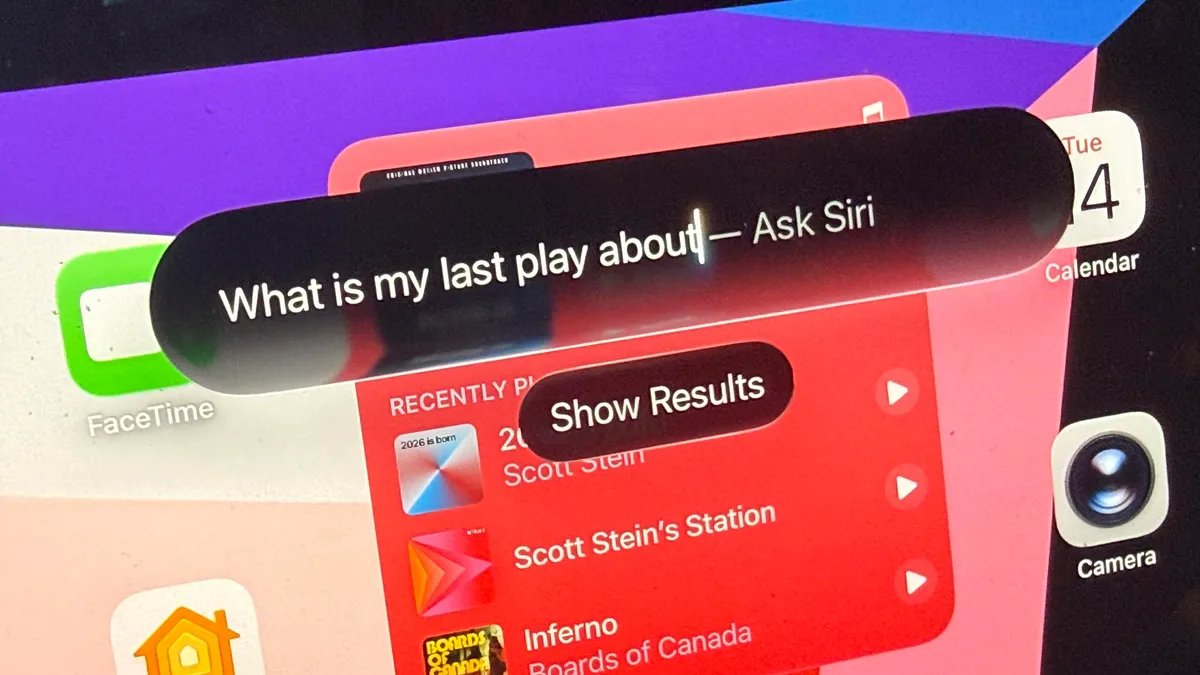
Siri can also be summoned by voice, or by a really lovely pull-down gesture from the top edge of the screen, which looks like a magic teardrop separating from the screen edge. It becomes a search bar, and if you ask certain questions it’ll also tap directly into Siri. I asked what a friend of mine just told me the other day, and it searched email and messages until the info surfaced. I also tried asking for all instances of when I discussed magic recently.
Within moments of downloading the first beta, I found drafts of my play scripts in email that Siri quickly analyzed and gave comparative thoughts on. I can find conversations I lost track of. Siri is limited to Apple’s apps and services for now, at least until third-party apps build hook-ins for Siri to access. That’ll happen at a major scale most likely in the fall, when iPadOS 27 and iOS 27 move out of beta. For now, don’t try to summon all your apps via Siri just yet.
Yeah, I ask Siri about my old docs a lot. The new Siri app holds all previous sessions for reference.
Also, using the new Siri for searching big repositories of Apple-stored things I have, like Notes, is a huge eye-opener. I use Notes like a short-term memory tool a lot of the time, and now Siri is hooked into that memory … and it feels like an extension of myself, a bit?
Siri is a local type of AI memory (also triangulated into Apple’s cloud), a different thing than AI services I have to seed information into. And in that sense, it’s also more instantly useful, I think. I’m sure it’ll all get notably better in the fall when more third-party apps can hook into it, but I think Siri is something I like now.
The iPad’s between-device feel is also something I’m coming to appreciate. IPadOS 27 sometimes feels like a larger iPhone, and other times feels like a Mac. It pulls features from OS updates in both. And maybe that just shows that, after all these years, the iPad really is where both the iPhone and the Mac are heading eventually. I’m here in the middle still, on this iPad Air, waiting it out.