The $10 home network upgrade that permanently fixes your mesh Wi-Fi
Mesh Wi-Fi is supposed to fix dead zones without filling your home with Ethernet cables. After all, Ethernet is fantastic, but only if you can easily run the cable from place A to place B, and preferably without it becoming an eyesore.
The problem is that wireless mesh nodes have to communicate with each other while also serving your devices. Luckily, you can fix that hidden bottleneck with a single cable.
Your mesh nodes are sharing their Wi-Fi connection
Wireless backhaul uses bandwidth your devices would be happy to get
A mesh node does more than broadcast Wi-Fi to the devices around it. It also has to send all of that traffic back to the primary router, and in a fully wireless mesh setup, that connection travels over Wi-Fi, too. This link between the nodes is known as a wireless backhaul.
On a dual-band mesh system, backhaul traffic may compete directly with phones, laptops, TVs, and every other device in your house that would also love to get a piece of that Wi-Fi pie. Tri-band systems often reserve a separate band for communication between nodes, but even that connection can slow down when it has to pass through several walls, cover a long distance, or deal with interference.
This is why adding more mesh nodes doesn’t always equal better performance. A satellite with a weak connection to the main router may give you a strong Wi-Fi signal in the room, but every bit of data still has to cross that slower backhaul link before reaching the internet. This is where the problems tend to crop up.
-
- Coverage
-
4,500 square feet
- Number of Devices Supported
-
75+
- Brand
-
eero
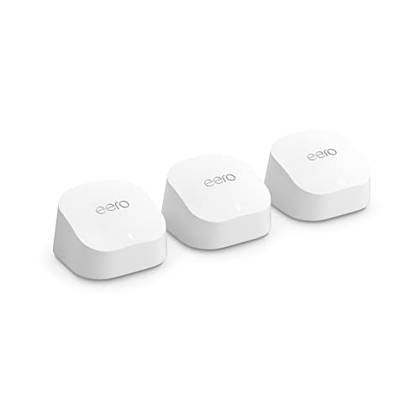
Eero’s Wi-Fi 6 mesh pack is pricier than TP-Link, but it’s still good value.

Ethernet backhaul removes the hidden bottleneck
The cable handles traffic between your mesh nodes

Luckily, the fix is both simple and cheap.
Instead of forcing that weak wireless link to carry everything on its back, Ethernet backhaul can truly save the day here. It moves the communication between the mesh nodes onto a wired connection.
This gives the satellite the much-needed freedom to focus its wireless radios on nearby devices rather than using part of its capacity to relay traffic back to the main router.
The result is often faster, steadier performance from devices connected through that node, especially during large downloads, video calls, gaming, or simultaneous streaming across the entire network. Note: This doesn’t miraculously make your internet faster. However, it can stop the mesh system itself from holding that connection back.
You only need to wire the nodes that matter most
One strategically placed cable may be all you need

The good news is that you don’t have to turn your home into a networking lab for this to bring you some benefits. Ethernet cables are magic, but having them everywhere defeats the whole purpose, after all.
Start with the satellite that has the hardest job, such as the one serving your office, gaming room, or living room full of streaming devices. Even a single wired connection there can take a surprising amount of pressure off the rest of the network.
The best candidate is also usually the node that sits far from the main router, has several walls or floors in the way, or regularly handles lots of traffic. Your other satellites can stay wireless, so you still get the flexibility that made mesh worth buying and setting up in the first place. So, wire the problem node first, test the results, and only add more cables if your network really needs that extra crutch to fall back on.
Setting up wired backhaul is usually simple
Connect the nodes and let the mesh system detect the link

Once you’ve got your heart set on a particular node (or two), the setup is usually wonderfully uneventful, which is just the way we like it.
Connect a LAN port on the primary mesh router to an Ethernet port on the satellite, then give the system a moment to recognize the new link. The cable can also pass through an unmanaged network switch, so the two nodes don’t necessarily need a direct point-to-point connection.
Most mesh systems should do the job automatically, but open the companion app and check that the satellite is listed as wired or connected through Ethernet. If it stubbornly stays on wireless backhaul, restart both nodes and check the manufacturer’s instructions, as some systems expect you to use a particular port or connect the nodes in a specific order.
A faster Ethernet port can matter on newer mesh systems
Gigabit backhaul is not the ceiling anymore

For most homes, a regular gigabit Ethernet link is plenty, but newer Wi-Fi 6E and Wi-Fi 7 mesh systems increasingly come with 2.5GbE ports for a reason.
Multi-gig backhaul can be useful if you have an internet plan faster than 1Gbps, regularly move large files to a NAS, or expect one wired node to serve several fast devices at once. Just remember that every part of the route has to keep up, including the main router, satellite, switch, and cabling, or that shiny 2.5GbE port will spend its life waiting on slower hardware, kind of defeating the whole purpose.
Wired backhaul doesn’t make mesh Wi-Fi pointless
You keep roaming and centralized management

Running a cable to a satellite doesn’t suddenly turn your mesh system into a collection of unrelated access points. You still keep the single network name, companion app, automatic updates, coordinated roaming, and centralized settings that make mesh systems so easy to live with. Your phone can continue moving between mesh nodes as you walk through the house (although watch out for hidden bottlenecks), blissfully unaware that some of them are “cheating” by connecting via Ethernet.
Wired mesh mixes convenience with reliability
That’s really the sweet spot here. You get the straightforward setup and whole-home coverage of mesh Wi-Fi, but the busiest nodes no longer have to depend on a (semi) temperamental wireless link behind the scenes. Even just one well-placed cable can overhaul your entire network.