I tested 5 phones for on-device AI and only 2 actually worked without Wi-Fi
Every device I own claims to have AI features built in now. I wanted to know how many of them actually process anything without an internet connection, though, so I pulled up airplane mode on each and ran the same test on five phones and tablets sitting around my house.
The only rule was no network connection; if it doesn’t work without phoning home, it’s not truly on-device AI.
Kill the internet and see what breaks
What “on-device” actually means

On-device AI just means the processing happens on your phone’s own chip, not on a server somewhere else. Your photo, your voice memo, or your text never leaves the device, and the feature keeps working even with no signal. Cloud AI does the opposite: it sends your data out, waits for a server to process it, and sends a result back, which is why it needs a connection to function at all.
Device makers use the word “AI” for almost anything now, and it doesn’t always come with a label explaining where the processing actually happens. To test that, I turned on airplane mode on each device first, then tried to trigger a specific AI feature I already knew was supposed to work locally, with zero connection. A feature that spins forever, throws a network error, or was never installed in the first place is either cloud-based or nonexistent, I figure.
I took a look at five devices: my iPhone 15 Pro Max, Pixel 9, OnePlus Open, a 2018 iPad Pro 12.9-inch (3rd generation), and a TCL NXTPAPER 14. I’d already benchmarked all five for gaming earlier, so I had a good sense of which ones had the horsepower on paper. On-device AI turned out to be a completely different story.
Only two of my five devices survived without Wi-Fi
My Pixel 9 and iPhone 15 Pro Max didn’t skip a beat
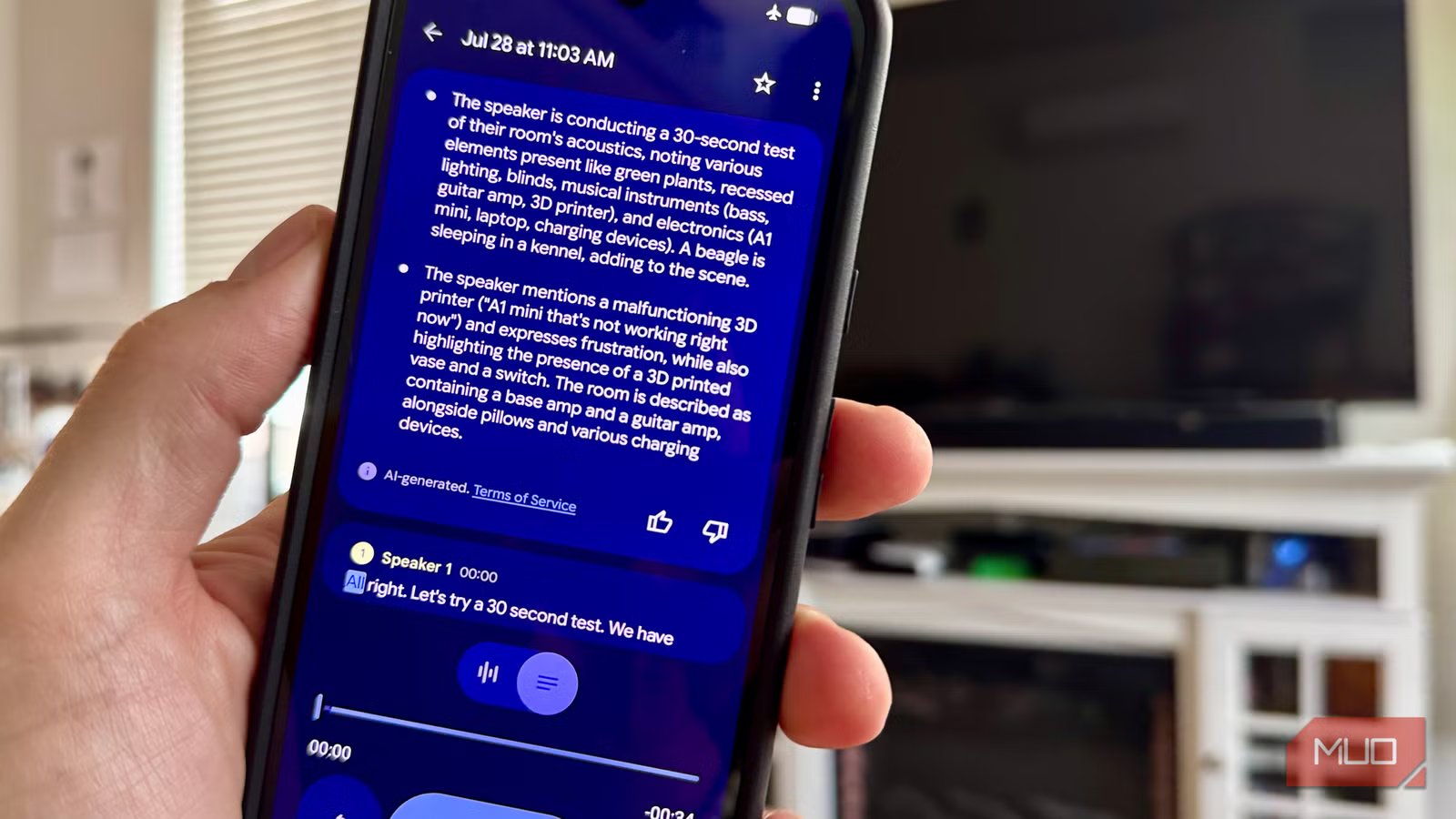
On my Pixel (with airplane mode on), Recorder’s Summarize feature generated a full three-bullet summary of a voice memo, Pixel Screenshots searched and surfaced results from my saved screenshots, and Magic Compose suggested replies in Google Messages. All three run on Gemini Nano, the small model Google builds directly into the Tensor chip. Gemini Nano runs on the Pixel 8a and newer, with the version on the Pixel 9 series adding multimodal support, which is why Google leans on it for so many features beyond just messaging.
On my iPhone 15 Pro Max, Writing Tools rewrote a paragraph in Notes with no connection at all, and notification summaries generated normally in airplane mode as well. That tracks with Apple’s own requirements: Apple Intelligence needs an A17 Pro chip and 8GB of RAM at minimum, which the 15 Pro Max just clears. Priority Notifications is one of the features that specifically uses on-device intelligence to sort what lands at the top of your lock screen, and it’s a good example of the more discrete Apple Intelligence features doing what they claim to.
Two failed for the same missing piece, and one failed for a different reason entirely
The OnePlus Open and the TCL tablet are both missing the same thing, and the iPad is just too old

Neither my OnePlus Open nor the TCL NXTPAPER 14 has the Android AICore app anywhere on the device, not in the Play Store, not in the system apps list. That’s the real root cause for both: no AICore means no Gemini Nano at all, regardless of what other AI branding shows up in the marketing.
For the OnePlus Open specifically, Gemini Nano support only arrived on OnePlus hardware with the OnePlus 13’s Snapdragon 8 Elite chip, and even then it took a dedicated software update months after launch to add it. The Open’s older Snapdragon 8 Gen 2 never got that update. OnePlus does have its own AI Eraser tool built into the Photos app, and it did roll out to the Open specifically, so I tested that too, using the same airplane mode rule. I got an immediate “no network connection” message and the AI Eraser tool didn’t even launch. So the Open actually fails twice over: no AICore, and the one native AI feature it does have needs a live connection to launch.
Sorry, old iPad, but no Apple Intelligence AI for you.
The TCL tablet has no comparable native feature (AICore) to fall back on, just the standard cloud-based Gemini app. Its Helio G99 is a budget chip built for battery life and cost, not the kind of dedicated AI silicon that AICore looks for before it’ll even offer to install. That leaves the NXTPAPER 14 out of on-device AI features, too.
On my ancient iPad Pro 12.9-inch device, Settings only shows a standard Siri menu with no Apple Intelligence & Siri section at all. That’s pretty much what I expected. Apple Intelligence requires an M-series chip or an A17 Pro at minimum, and this iPad’s A12X Bionic dates to 2018, years before either existed. Sorry, old iPad, but no Apple Intelligence AI for you, on device or not. Of course, the A12X Bionic isn’t a chip with zero on-device intelligence, as Face ID and Live Text run locally too. It’s just too old for the generative AI features ‘Apple Intelligence’ refers to
“AI” on a spec sheet doesn’t mean on-device
Two out of five of these range of older devices actually did what “on-device AI” promises: work with the internet turned off. Of the three that failed, two came down to the exact same missing piece, no Android AICore, and the third failed for a completely unrelated reason: the iPad is just old. If you’re shopping based on an “AI features” bullet point, that phrase is doing a lot less work than it looks like. The only way to know for sure is the same one I used: turn off the internet and see what still works.