That USB flash drive you rely on is slower and less safe than this alternative
USB flash drives are something that many of us grew up with, and I’ve owned so many since I started using computers about two decades ago. They’ve always been cheap and convenient, so I never really had a reason to look elsewhere, especially as USB standards kept getting faster over the years. Today, we have USB4, which supports up to 40Gbps, but if you look around, you won’t find a single mainstream USB4 flash drive on the market. That alone should make you wonder why flash drives haven’t kept pace.
Sure, we have USB4 external SSDs, but that only reinforces my point. If the latest USB standard is being adopted by portable SSDs rather than traditional flash drives, maybe it’s time to rethink what we carry in our pockets. But you don’t need to buy an external SSD. At this point, many of us already have a spare M.2 SSD sitting in a drawer after upgrading our PCs, so all you really need is a $30 enclosure to repurpose it into a portable drive that’s much better suited to large file transfers.
Flash drives have mostly hit a wall
The USB interface isn’t what’s holding them back

If you look at some of the fastest USB 3.2 Gen 2 flash drives on the market, like the SanDisk Extreme PRO Dual Drive or the Kingston DataTraveler Max, you’ll see they advertise read speeds of up to 1,000MB/s and write speeds of up to 900MB/s. That’s already close to the practical limit of a 10Gbps USB connection, so it might seem odd that manufacturers haven’t moved on to USB4. The reality is that the USB interface isn’t what’s holding flash drives back anymore.
You may actually get those speeds when transferring smaller files, but as you copy larger files, write speeds drop significantly once the drive’s write cache fills up. It’s even worse with cheaper flash drives, which may start at over 100MB/s before dropping to just 20-30MB/s for the rest of the transfer. That’s because sustained performance depends far more on the controller and NAND inside these drives than on the USB interface. Considering how tiny they are, there’s only so much room for better controllers and adequate cooling to sustain those speeds.
An NVMe enclosure is worth every penny
Because even your old PCIe 3.0 SSD suddenly becomes overkill
When I upgraded to AM5 earlier this year, I ended up with a spare Samsung 960 EVO PCIe 3.0 SSD that was sitting in my drawer until I needed external storage again. Instead of spending hundreds of dollars on a high-end flash drive or external SSD at these inflated prices, I bought a $30 enclosure to repurpose my old drive. It uses a USB 3.2 Gen 2 connection, which means it’s limited to around 1,000MB/s. That’s barely a third of what the 960 EVO is capable of internally, so the enclosure is the bottleneck, not my decade-old SSD.
I could always upgrade to a USB4 enclosure later if I ever needed even higher transfer speeds, but even as it stands, it outperforms virtually every USB flash drive on the market. It can sustain its speeds for significantly longer during large file transfers, and even after its write cache fills up, it doesn’t slow down nearly as much as flash drives. And since NVMe drives are built to be primary storage devices, they have more capable controllers, better error correction, and wear leveling, making them a safer place to store important files than your average flash drive.
The only thing you’ll miss is the convenience
A faster and more versatile drive is well worth that trade-off

One of the biggest reasons to still buy a USB flash drive is its portability. You can slip one into your pocket or leave it on your keychain, and carry it around all day without thinking about it. That’s not exactly something you can get with an NVMe enclosure. They’re larger and bulkier because they have to accommodate a standard M.2 SSD. On top of that, you’ll need to carry a USB-C cable, so it’s nowhere near as pocketable as a flash drive.
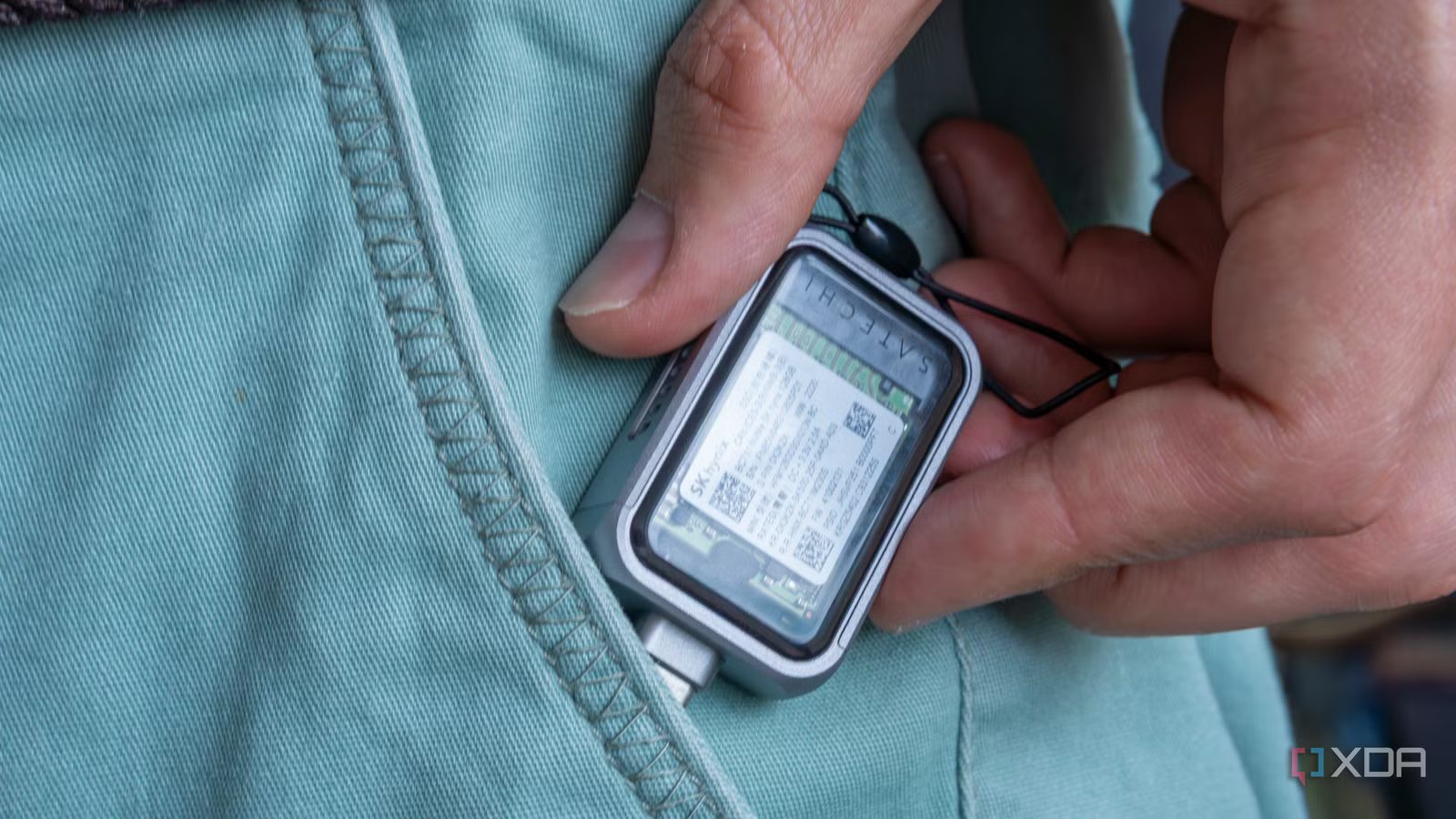
But I think that’s a trade-off most of you will be willing to make for what you get in return. You’re not paying full price for a new drive here. You’re only paying for the enclosure so you can reuse your old drive, which is significantly faster, more reliable, and far more versatile. For instance, if you need even faster transfer speeds, all you have to do is upgrade the enclosure. And if you ever need another SSD in your PC, you can simply remove it from the enclosure and reinstall it. That said, if you happen to have an M.2 2230 SSD, there are even mini NVMe enclosures, like Satechi’s, so you don’t even have to sacrifice portability.

- Capacity
-
Drive not included
- Power
-
Bus-powered
- Speed
-
Up to 10Gbps
- Connection
-
USB 3.2 Gen 2 port (or included cable)
Your old SSD doesn’t have to sit in a drawer
With storage getting more expensive, it makes more sense to reuse your old NVMe drive rather than pay inflated prices for a new USB flash drive or an external SSD. Sure, it may not be fast enough to be your primary storage drive, but it’s still overkill as an external drive. When a simple enclosure can turn a decade-old SSD into one of the fastest external drives you’ve ever owned, there’s no reason to let it sit in your drawer collecting dust. If anything, you’re getting something significantly faster for the price of a cheap USB flash drive.