I built the same complex dashboard with Claude Code, Codex, and GitHub Copilot, and the winner surprised me
AI coding tools can generate a landing page in minutes, but that does not tell me much about how they handle a real project. I wanted something more demanding, so I asked Claude Code, Codex, and GitHub Copilot to build the same complex finance dashboard for my upcoming home renovation.
I applied the same requirements to each tool and compared how well it planned the project, structured the code, handled UI details, and refined the final experience. I expected one result going in, but the tool that pulled ahead was not the one I had predicted.
A word on the prompt
And used coding models

To keep the comparison fair, I gave all three tools the exact same prompt and asked them to build a financial dashboard to track my 10-month home renovation project.
The brief covered room-wise budgets, contractor profiles, purchase records, pending payments, invoices, expense categories, filters, charts, and detailed reports.
I also made it clear that I wanted a functional application rather than another polished-looking prototype with placeholder buttons.
For Claude Code, I used the latest Fable 5 model, while Codex ran on GPT-5.6 Sol. In VS Code, I used the latest Agents view and selected mai-code-1-flash via GitHub Copilot, a model built specifically for coding.
GitHub Copilot
Decent, but nowhere near being the winner
I started with mai-code-1-flash inside GitHub Copilot, and it was easily the fastest of the three by a wide margin. It moved from the initial prompt to a working dashboard almost immediately, and the first impression was strong, too.
The dark blue theme looked polished, and the rounded cards gave it a modern SaaS-style appearance. Most of the sections I had requested were already in place. I could log expenses, review charts, monitor budgets, and get a clear overview of the renovation project without much additional work.
However, the dashboard started to feel shallow once I looked beyond the homepage. The Rooms and Contractors sections displayed useful information, but there was no way to create new entries or edit the existing ones. Several parts felt more like static demonstrations than complete workflows.
It was a solid attempt and easily good enough for a quick showcase, but it lacked the finer details and deeper functionality needed to compete with the more powerful coding tools in this test.
Claude Code
Feature-rich and thorough, but visually dated
Claude Code with Fable 5 was easily the slowest tool in this comparison. It took noticeably longer to plan and build the dashboard, and the process consumed almost all my available tokens. By the end, I was getting dangerously close to the five-hour usage limit, which made the experience feel heavier than I expected.
That said, the final execution was far more complete than what GitHub Copilot produced. Claude Code paid attention to the minute details in my prompt and turned most sections into proper working workflows.
When I opened the Rooms or Contractors menu, I could create new entries, edit existing information, and fill in relevant fields, rather than simply viewing static cards. The Expenses section was also well-structured, with useful filters and sufficient controls to make the dashboard practical for daily tracking.
Unfortunately, the interface stopped it from becoming the clear winner. The typography felt dated, the spacing was inconsistent in several places, and the overall design lacked the modern, polished feel I expected.
Functionally, it was impressive and much deeper than Copilot, but visually, it left me disappointed. Claude Code delivered a capable result, but it did not do enough to win the test, which surprised me because I expected Fable 5 to come out on top.
ChatGPT Codex
Polished, complete, thoughtful, and resource-hungry
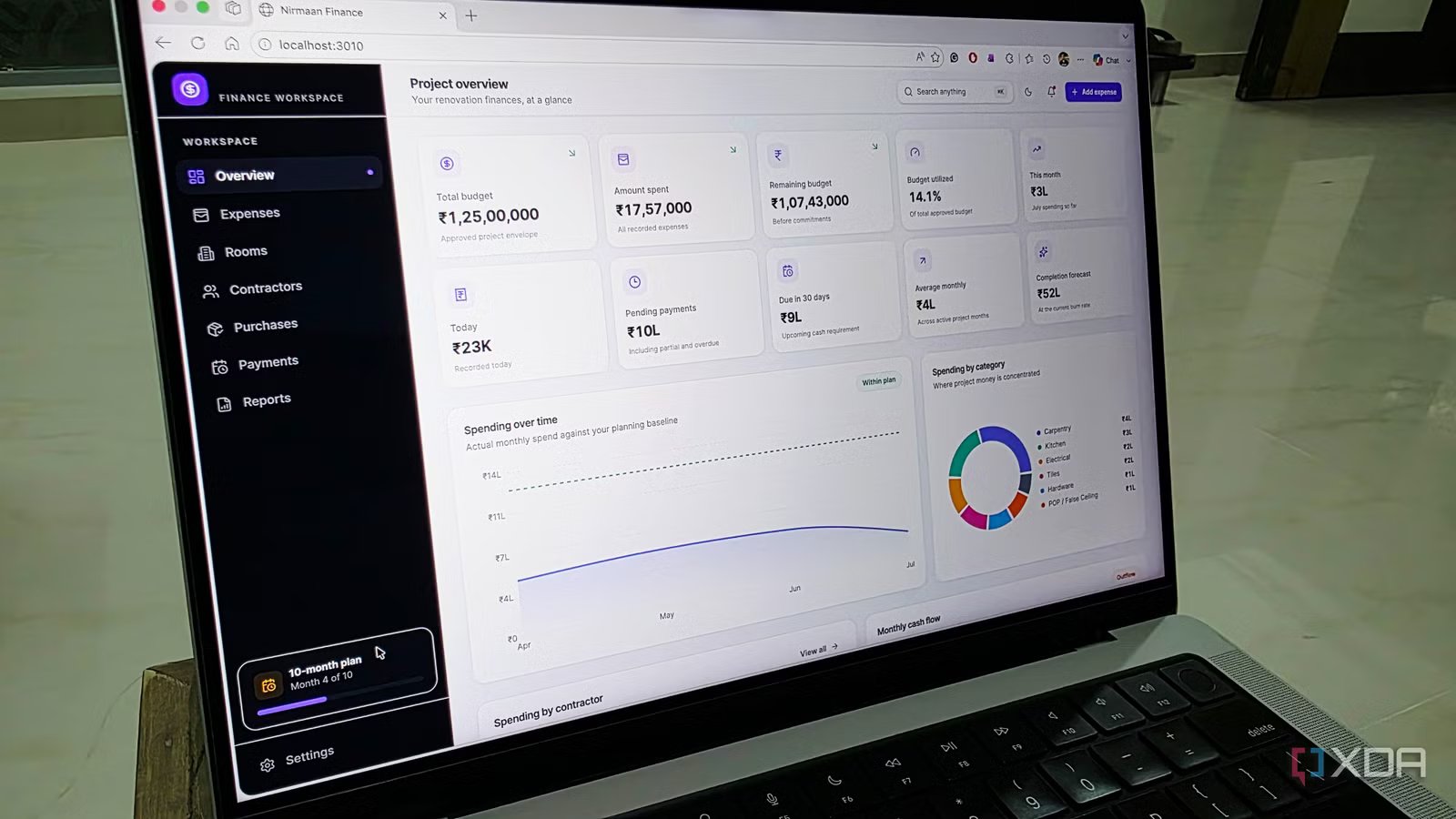
Codex with the GPT-5.6 Sol model was easily the best of the three. It struck the right balance between visual polish, feature depth, and attention to detail. The dashboard looked modern from the moment I opened it, with a clean theme, rounded corners, consistent spacing, and a layout that felt much closer to a finished SaaS product than an AI-generated prototype.
It even added a neat work-progress indicator in the bottom-left corner, which gave me a quick view of how the renovation was moving along.
More importantly, Codex did not stop at building attractive summary cards and charts. Whether I was adding an expense, purchase, room, or contractor, it provided all the relevant fields needed to create a detailed, data-rich entry.
The result felt practical enough for actual daily use over a 10-month renovation project.
My only real complaint was with the Codex app itself. My Mac ran hotter while it was active in the background compared with VS Code and Claude.
Thankfully, the token consumption was lower than in Fable 5, which was a major relief. Despite the thermal issues, Codex delivered the most complete and polished dashboard here.
One tool nailed the design
This test reminded me that speed, depth, and polish rarely arrive in the same package. GitHub Copilot was fast and produced a convincing demo, but its missing editing workflows made it feel incomplete.
Claude Code with Fable 5 delivered the deepest functionality, yet its dated design, spacing issues, heavy token use, and slow execution held it back.
Codex with GPT-5.6 Sol combined the best UI with complete workflows and thoughtful extras, while using fewer tokens than Claude.