Built a teleprompter that lets you click through the script while it’s on screen (100+ trials in, AMA)
 |
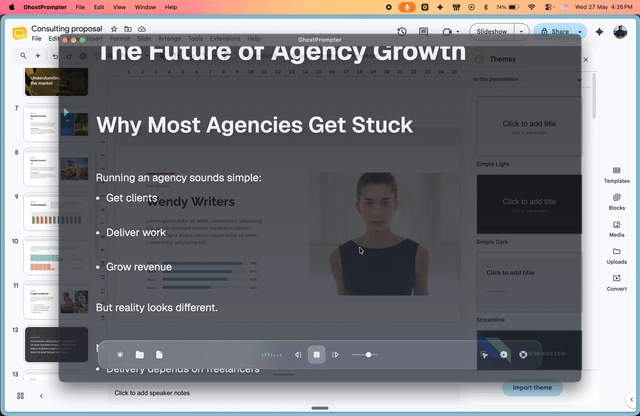
I kept losing my place mid-recording. Screen recording a tutorial, glancing at a second monitor for the script, breaking eye contact with the thing I was actually demoing. So I built GhostPrompter. The core idea: the script floats on your screen, but every click and keystroke passes straight through it to whatever's underneath. You can read your script and interact with your app at the same time. No alt-tabbing, no second monitor, no memorizing. Two other things it does: Voice-activated scrolling. The script follows your speaking pace. Slow down, it slows down. Pause, it pauses. No hunting for a manual scroll speed that matches how you actually talk. Invisible to screen capture. OBS, Loom, Zoom, whatever you're recording with, the overlay doesn't show up in the output. Your viewers never know it's there. Windows and Mac. $49 one-time, 2 device license, 14-day free trial, no subscription. Where it's at right now: 111 people have started trials, 8 have bought it. It was Product of the Day on PeerPush yesterday. Small numbers, I know, but they're real and I'm not going to dress them up. Happy to answer anything about how the click-through actually works under the hood, or what building this solo was like. If you record tutorials, demos, or anything where you're presenting and operating software at the same time, I'd genuinely like to know if this solves your problem or if I'm missing something. submitted by /u/Mysterious-Crazy-395 |