I promoted my vertical monitor and demoted my widescreen — it completely changed how I work
Summary
- Making the IPS my primary portrait monitor improved reading, writing, and coding focus.
- Tall monitor + wide monitor = match tasks to shape: vertical for docs/code, horizontal for chats and dashboards.
- Separating distractions to the sideways widescreen adds friction that reduces interruptions and boosts focus.
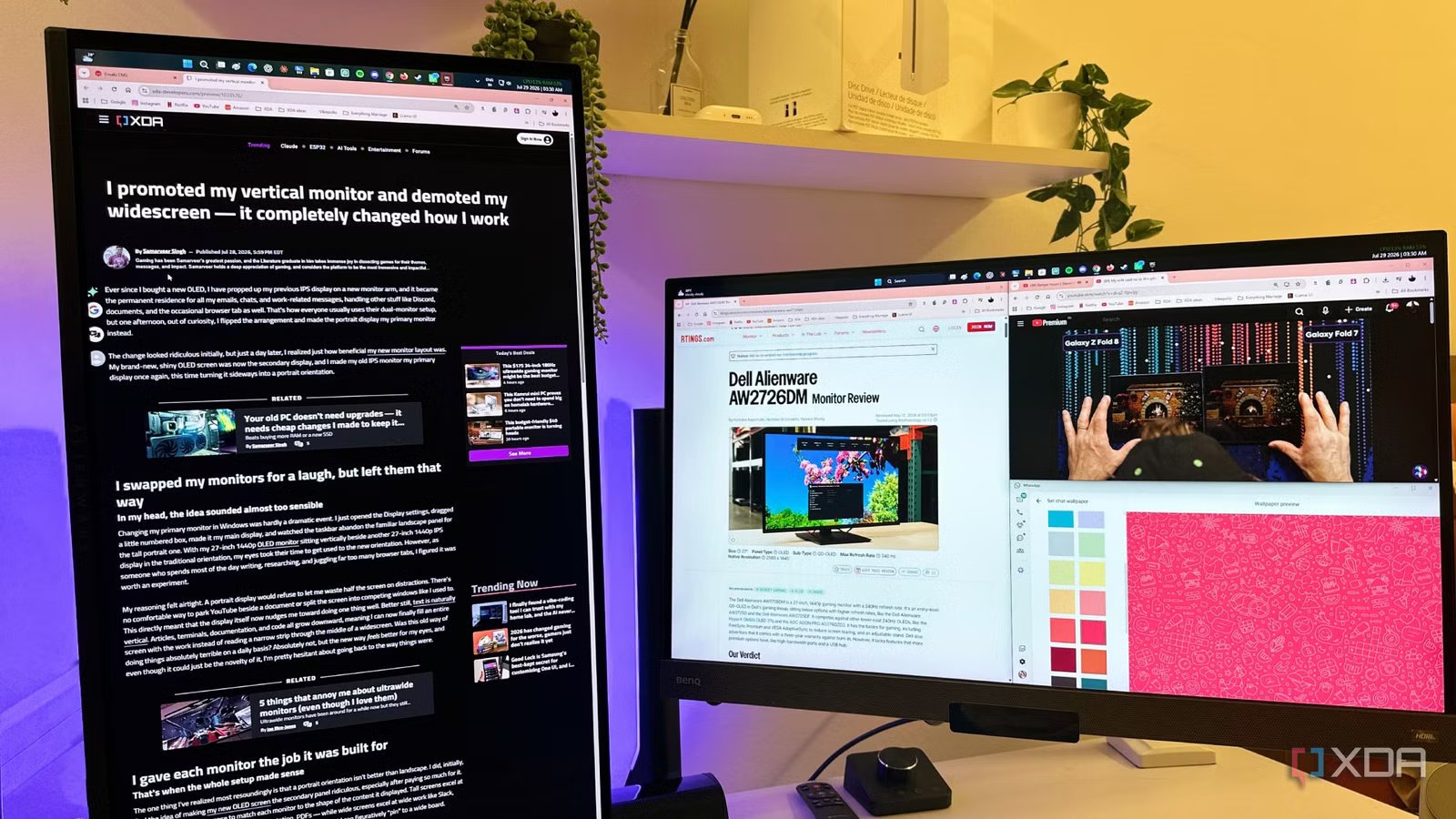
Ever since I bought a new OLED, I have propped up my previous IPS display on a new monitor arm, and it became the permanent residence for all my emails, chats, and work-related messages, handling other stuff like Discord, documents, and the occasional browser tab as well. That’s how everyone usually uses their dual-monitor setup, but one afternoon, out of curiosity, I flipped the arrangement and made the portrait display my primary monitor instead.
The change looked ridiculous initially, but just a day later, I realized just how beneficial my new monitor layout was. My brand-new, shiny OLED screen was now the secondary display, and I made my old IPS monitor my primary display once again, this time turning it sideways into a portrait orientation.
I swapped my monitors for a laugh, but left them that way
In my head, the idea sounded almost too sensible

Changing my primary monitor in Windows was hardly a dramatic event. I just opened the Display settings, dragged a little numbered box, made it my main display, and watched the taskbar abandon the familiar landscape panel for the tall portrait one. With my 27-inch 1440p OLED monitor sitting vertically beside another 27-inch 1440p IPS display in the traditional orientation, my eyes took their time to get used to the new orientation. However, as someone who spends most of the day writing, researching, and juggling far too many browser tabs, I figured it was worth an experiment.
My reasoning felt airtight. A portrait display would refuse to let me waste half the screen on distractions. There’s no comfortable way to park YouTube beside a document or split the screen into competing windows like I used to. This nudges me toward focusing on doing one thing well. Better still, text is naturally vertical. Articles, terminals, documentation, and code all grow downward, meaning I can now finally fill an entire screen with the work instead of reading a narrow strip through the middle of a widescreen. Was this old way of doing things absolutely terrible on a daily basis? Absolutely not, but the new way feels better for my eyes, and even though it could just be the novelty of it, I’m pretty hesitant about going back to the way things were.
I gave each monitor the job it was built for
That’s when the whole setup made sense

The one thing I’ve realized most resoundingly is that a portrait orientation isn’t better than landscape. I did, initially, find the idea of making my new OLED screen the secondary panel ridiculous, especially after paying so much for it. However, it made more sense to match each monitor to the shape of the content it displayed. Tall screens excel at tall work — articles, code, terminals, documentation, PDFs — while wide screens excel at wide work like Slack, browser tabs, dashboards, Excel sheets, and reference material that I can figuratively “pin” to a wide board.
While my widescreen keeps information available to me without demanding attention, the vertical panel has become the place where the real work happens. That’s because I’m not wasting horizontal pixels reading a narrow column of text down the middle of a 16:9 display anymore. Clearly, most knowledge work barely uses expensive horizontal pixels. For writing and reading, I’d much prefer a rotated 1440p monitor over a $700 ultrawide, any day of the week.
My widescreen became more useful, and less tempting
The biggest change happened outside my field of view

Half a week into the experiment, I realized that I’d been giving the portrait monitor far too much credit. It wasn’t the 9:16 aspect ratio that transformed my workflow, but rather the geography of my desk. Since I’d demoted my widescreen and banished it to the left, I made sure that Slack, Discord, Spotify, and email all went with it, along with every browser tab that didn’t require immediate attention. Those distractions moved far enough away that I had to physically acknowledge them before indulging them, and that alone has made a genuine difference.
Now that I have to turn my head, and sometimes even swivel my chair to read a message or indulge in some doomscrolling in the browser, I’ve found myself frequently avoiding the action, letting the distractions wait a little longer before turning my attention to them. The friction proved to be a feature instead of a flaw.
The friction that keeps distractions away turned out to be a feature rather than a flaw.
The portrait display has now become what I can only describe as my workspace’s home screen. My eyes naturally return there after every task, and opening another application feels less like changing windows, and a lot more like briefly leaving my desk before coming back. I’m sure that reading about it is going to be different from actually experiencing it. But now that it has clicked for me, my entire desk feels organized around a clear center of gravity. The vertical monitor is where the meaningful work happens, while the widescreen is now the playground for everything else that I visit a lot less frequently.
The payoff has been real, but not without drawbacks
This setup knows exactly who it’s for

It’s not like a portrait monitor can magically replace a widescreen, because outside of knowledge work explicitly, most workloads require a landscape orientation to actually be efficient. Without a widescreen setup, games would simply make zero sense, and videos, too, would become postage stamps. Even most operating systems, including Windows, are built with landscape monitors in mind, and yet, the trade-offs, for me, were worth making. Every task that felt awkward on the portrait monitor happened to be something I was trying to do less of while working anyway. This setup has almost proven to be a filter, making productive work more effortless, and turning leisure just inconvenient enough to stay in its lane.
Since my weekdays revolve around documents, code, terminals, and writing, this is the new orientation for me until Friday night. When the time comes to finally turn it back around to play, I find it easy to finally get past the friction of replacing the monitor-mounted webcam and mic and finally get to playing.

- Resolution
-
2160×1440
- Screen Size
-
27 inches
- Brand
-
Alienware
- Max. Refresh Rate
-
240Hz
- Response Time
-
0.03ms
- Inputs
-
2x HDMI 2.1, 1x DP 1.4
A different perspective makes it feel like I’ve had an upgrade
This has been a tiny experiment, and I’m not sure how long it will last, either. However, for the five-day work week, I do think that my primary display will remain vertical for all the benefits it provides during said work week. A display doesn’t become more useful because it’s bigger, after all. All that’s required is for its role to match the work in front of it. This setup absolutely does look backward to anyone who peeks into my room, but after a while, it does feel pretty natural.