I rebuilt my home servers from scratch, and this is the OS setup I wish I’d started with
When I set up my first home server, I won’t lie and say it was Proxmox. It was Ubuntu Server, something I had extensive history and experience using. I eventually ended up on Proxmox, but the journey here could have been skipped entirely if I had started with the Linux-based hypervisor from the get-go. I recently rebuilt my home lab from scratch, and Proxmox was front and center, creating the ultimate home-based data center.
Proxmox offers the best of both worlds
It’s great for self-hosting and data storage

Prior to trying Proxmox, I would always view a server and network-attached storage (NAS) as two completely separate elements. They only shared internal parts, as the software running on them and the tasks handled were vastly different. That’s not the case with Proxmox. This may be a hypervisor, but that allows the platform to be used for just about everything within the home lab. Need a NAS? Proxmox can handle it. Self-hosting? That too. It’s very versatile.
But even if you choose not to use Proxmox for everything, it’s now the default OS for my servers. TrueNAS happily chugs away with countless terabytes of storage available across the entire network, but it’s Proxmox that brings everything together with self-hosted apps. Using Debian, Ubuntu Server, FreeBSD, or some other flavor of Unix allows for some powerful servers to be created. It’s much easier to go from nothing to a bustling home lab with Docker containers.
That’s where cracks can start to appear. For instance, when I first launched one of my home-based servers with Ubuntu Server, there wasn’t really a way to manage it remotely with a functional web UI. I couldn’t simply load up a URL in the browser on any device connected to the network. SSH is perfectly serviceable, but sometimes I don’t want to work in access or bother running long commands on a touch screen. I wanted something a little easier to use.
Even if you happen to be an absolute Linux beginner and are looking to move away from using prebuilt NAS enclosures or wish to supplement one with a slightly more capable system, Proxmox is still the way to go.
It’s surprisingly easy to learn and use
You’ll go from zero to hero in no time

Proxmox isn’t anywhere close to as daunting as it may seem initially. Sure, the installation process may not be as refined as Windows, macOS, or even Synology’s DSM, but it doesn’t need to be. This is going to be the only time you see it with a single home server. I’ve only had to reinstall Proxmox once, and that’s because I did something really dumb. That’s the beauty of Proxmox. It’s an underlying system for other OS installs and software to run on top of.
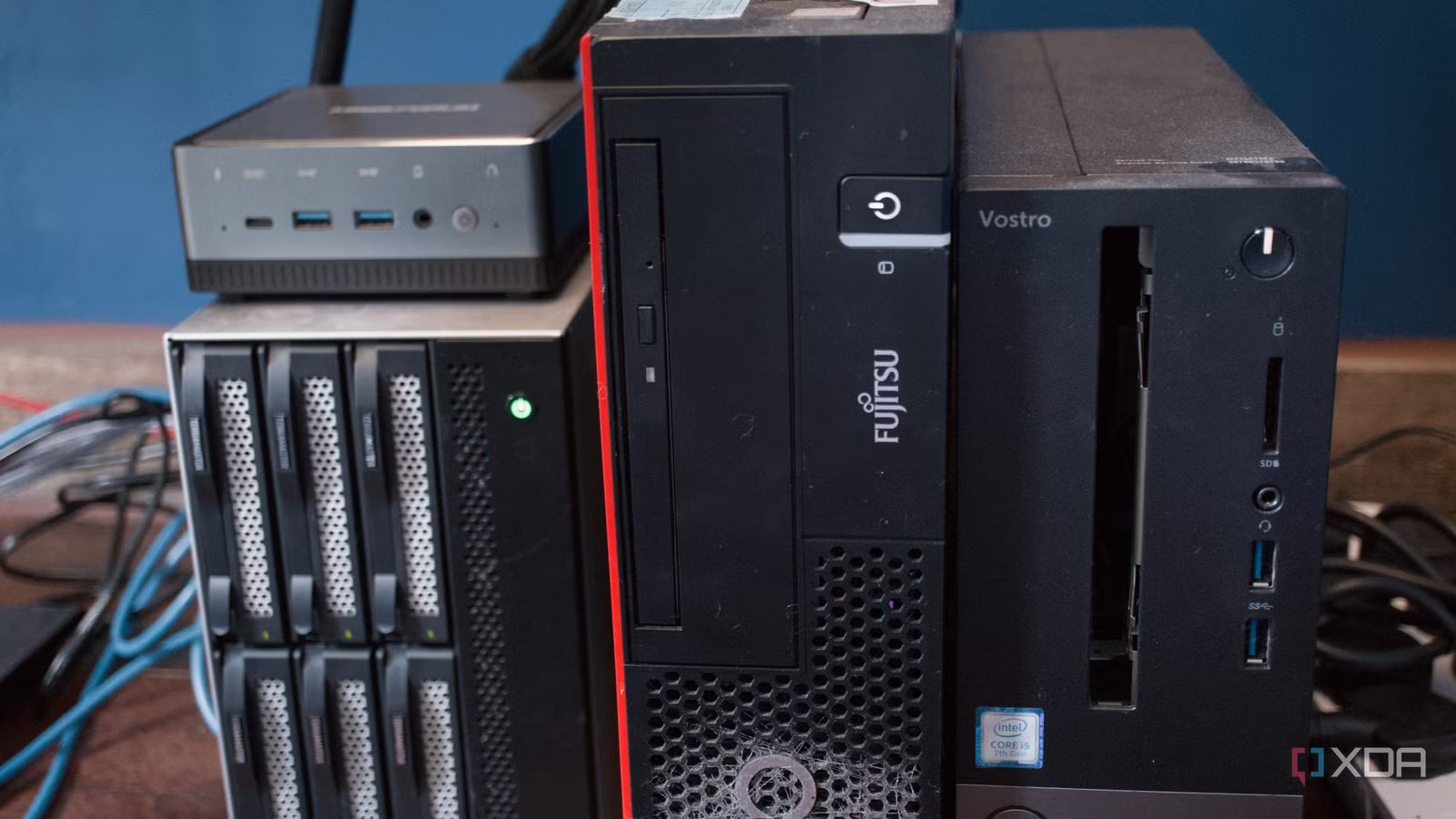
If you’re in the camp for wanting to learn more about Linux and virtualization, wish to consolidate self-hosted services, want to get into some cool technology like Pi-hole, and fancy yourself some experimentation, Proxmox is one of the best solutions. I currently have a cluster of three nodes. Two of these are almost identical business-class desktop systems with an Intel Core i5-7400 CPU, and the third is a Minisforum U850 with a Core i5-10210U.
These aren’t powerful systems by any stretch, especially given I tried running my entire home lab on a single server with a 64-core AMD Ryzen Threadripper, but they’re also incredibly friendly to my renewable energy installation and monthly utility bill. I can have everything runng — and by everything, I mean all services and a NAS storing all data — all for just north of $1 per day. That’s around $37 per month and $450 each year.
It’s all about the savings (no, seriously)
Compare that to a Netflix subscription, the cheapest starting from $9 per month. This one service costs more than $100 each year. There’s a good chance you have multiple streaming services up and running, not to mention cloud storage and maybe even Microsoft Office. All this adds up and likely surpasses the amount I’m paying for a fully packed NAS and three Proxmox nodes running my entire home lab and smart home.
If you’re wanting to maximize savings, this could be achieved by using a single prebuilt NAS or custom build with an OS that supports containers. Another way is to use Proxmox to run TrueNAS or some other NAS software in an isolated instance alongside all your services. That’s the beauty of Proxmox and the wider home lab … it’s so flexible and can adjust to personal requirements. Being able to fire up Home Assistant and automate everything is such a joy.
I should have started with Proxmox from day one
It does it all (and so much more)

Proxmox isn’t the easiest OS to interact with, nor is it the best Linux distro for beginners. In fact, it will probably encourage you to dive even deeper into those subjects. Things such as hardware passthrough, storage pools, backups, and clustering can still become complicated and still trip me up to this day. Running local LLMs is brilliant if you can get all the stars to align; otherwise, you’re in for a world of pain. The difference is that Proxmox gives you a far better foundation from which to tackle them.
I would likely encounter the same or other problems with another platform, and the web UI included with Proxmox makes it easy to manage everything. If I want to test a new service, I can create an isolated environment, experiment with it, and delete the entire thing if it doesn’t work out. Snapshots and backups also make it much easier to recover when an update, configuration change, or questionable late-night idea goes wrong. Honestly, snapshots are so good that I stick with them for migration too.
I no longer have to decide whether a server will be dedicated to storage, smart-home management, media streaming, or general self-hosting before installing an OS. I know what I’m going to be using as the underpinning glue to hold everything together. Proxmox lets the hardware take on several roles at once, while still keeping each workload reasonably organized and isolated.
But starting with Ubuntu Server wasn’t a mistake. If I had used Proxmox earlier, I would have gained the same Linux experience without limiting the entire server to a single operating system. After rebuilding everything from scratch, Proxmox has become the part of my home lab I think about the least, and it can prove challenging to view that as the end goal. Whether you’re starting with an old desktop or planning a multi-node cluster, it’s the OS setup I wish I had chosen from the very beginning.