I turned an old phone into the ultimate pocket music server
Playing music via the command line is a joy for many Linux users. Besides, who wants to pay for a Spotify membership or any other streaming service, when you can stream files to your computer directly from your phone’s local storage? Or just listen from the phone itself? I decided to test it out.
For this project, I used a Motorola Moto G, Termux, and a desktop running Linux Mint Cinnamon. For the music, I transferred several albums from my personal collection to my phone’s local storage to use for playback.
Creating a music server via Termux
A fast music player with a visualizer component
I’ve always wanted to set up a music server with a built-in visualizer, so I could listen to long form music and enjoy some visuals with it. I also wanted to try out an alternative CLI music player to the one I typically use
I have an updated version of Termux on my device (a Motorola Moto G), so I set up an MPD server on Termux. Mpd (short for Music Player Daemon) and ncmpcpp (an MPD client with a lot of useful features) are great combination for listening to the music stored on your device.
I followed the tutorial on the GitHub page to get up and running. I renamed the primary folder to simply mpd and used pwd to find the path. All of my music was located on my phone’s primary storage, so I copied into the mpd directory using cp /sdcard/music mpd.
To make mpd work as a server, you have to change the configuration file and daemonize it, which is just a fancy way of saying “configure the program to run continuously as a background process.” Both mpd and ncmpcpp need configuration files to work correctly.
Setting up the configuration takes a minute
A slightly frustrating, yet necessary step

For the configuration file, all you’re doing is enabling streaming by making a few adjustments to the configuration file.
Building the file itself required some research. I found several excellent configuration resources, but this tutorial was particularly helpful. You can tweak your settings after doing the initial configuration, but be sure to configure your audio_output section to use sles since we’re doing this on an Android phone.
SLES is the audio output plugin that’s native to Android audio systems. Most of the issues I had initially were location-based. I accidentally put my ncmpcpp configuration file in the wrong directory. I also had to grant termux-setup-storage permissions to enable the daemon to work.
But the most significant frustrating point was my error: I left the localhost IP address (127.0.0.1) address in the bind_to_address setting, which kept blocking the stream to my computer. It should have been 0.0.0.0 to allow local Wi-Fi streaming. In my excitement, I overlooked it. But once I figured it out, I launched my new player with mpd && ncmpcppin Termux.
Getting around in ncmpcpp requires keyboard shortcuts
But there aren’t many of them, and they’re easy to remember
Like other CLI music players, ncmpcpp one relies on keyboard shortcuts. The most vital ones to know are p for pause/resume, s for stop, and x to play the highlighted track (you can also hit Enter). Volume is + or - and skipping uses the and > symbols.
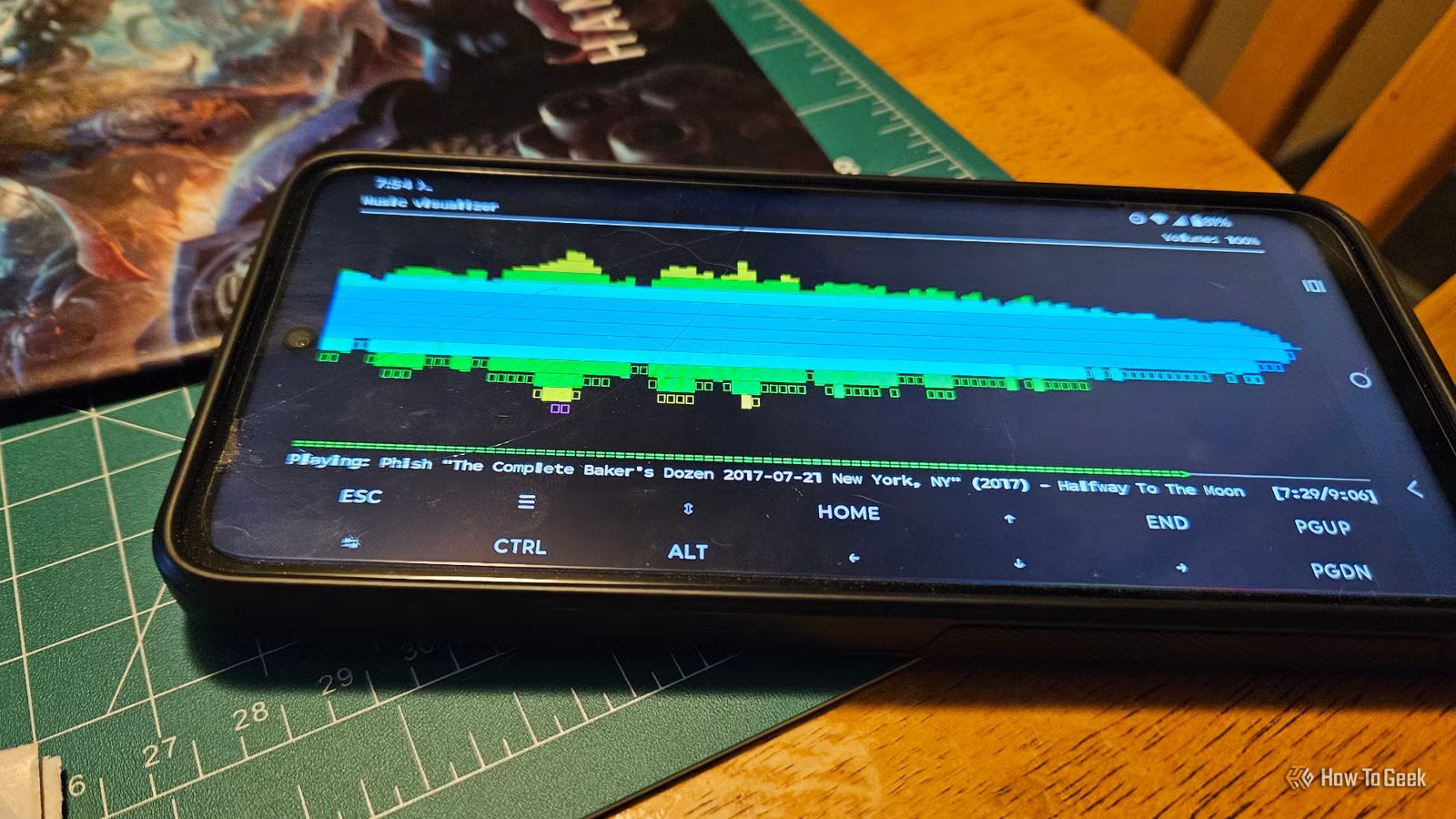
To access menus, you’ll want to hit 4 to access your library and 1 to check out your playlists. Pressing 8 will open the visualizer.
The visualizer was a major reason I wanted to set this up on my phone. It’s a multicolored spectrum that reminds me a bit of the old Atari game Breakout. It’s utterly mesmerizing.
When you’re done listening, hit q to exit the ncmcpp interface. If you don’t want to use the command line, there’s an Android app called M.A.L.P
Even if you exit the program, the mpd will continue playing music in the background. Use mpd --kill to stop it.
Using MALP to control playback from your phone
A simple app connects to your server
Unlike some of the other CLI music players out there, mpd integrates with an app called M.A.L.P. to allow playback control through a typical Android music player interface. Think of it like a remote control for mpd.
To use it, I grabbed it from the Google Play Store. Once installed, I set up a profile, which required a username, the port for mpd, and an optional http streaming port. I used localhost 127.0.0.1 to test the app.
It works fine (although the artwork it pulled for the albums was vastly different than they’re actual art) and will be useful for users who want that type of experience. Some users might prefer controlling things in the keyboard via Termux, but your experience will, as always, vary.
The app is a nice feature and it can help bridge the gap between folks who love working in the Terminal and those who prefer the feeling of a traditional Android app. Both MALP and the normal commands factor into controlling the stream when you send it to your computer as well.
Streaming music from your phone to your laptop is a blast
The setup is seamless and only takes a few minutes
Now that we have our server set up, configured, and playing some jams, it’s time to send the stream over to Linux. I’m using Linux Mint Cinnamon, working predominantly in the Terminal. I like to use VLC media player for stuff like this because of the built-in visualizations.
It’s worth noting you can use sox, mpv, or any application that can open a network stream for this.
To open my audio stream, I used the Terminal with VLC http://phone-IP-address:8000. I know my phone’s IP address, but if you need to find it, it’s typically under Settings > About Phone > Device Identifiers on Motorola Moto G.
You can also open streams directly from VLC media player’s GUI. Go to Media > Stream > Network and enter the same URL as above.
Since you’re doing an HTTP stream, you’re broadcasting raw audio data to VLC media player. VLC mirrors playback controls from MPD or MALP on your phone. This is because it stops the audio feed entirely when you pause, stop, or skip a track. Volume controls, however, are dependent on the device. So, when I stream from my phone, I simply turn the volume down entirely and let my computer speakers do all the work.
Keep in mind, there is also a few seconds’ delay between your phone’s audio playback and what you hear in VLC. I have mine set to encode into Vorbis format.
A fun weekend project transformed into a permanent setup
Building your own streaming server using local files and self-hosting doesn’t have to be a complicated weekend project. From start to finish, this entire project took roughly two hours. That was after I spent a few hours reading up on configuring mpd and ncmpcpp for my devices.
But it was an incredibly fun home lab project and one I highly recommend if you’re a music fan and happen to have a Baker’s dozen worth of Phish concerts you want to stream from your phone. I’ll be using this often now, especially when I’m working at home.