Kali365 Phishing Kit Abuses Microsoft Device Codes to Hijack Microsoft 365 Accounts

A phishing kit known as Kali365 is targeting U.S. organizations through device code phishing attacks that abuse Microsoft’s legitimate authentication process to hijack Microsoft 365 accounts.
Unlike conventional phishing campaigns that direct targets to counterfeit login portals, Kali365 sends victims to a real Microsoft Device Login page. Victims are persuaded to enter an attacker-provided device code and complete authentication, unknowingly authorizing an attacker-controlled application or session.
The technique allows threat actors to obtain OAuth access tokens and refresh tokens, potentially giving them persistent access to corporate email, SharePoint files, OneDrive data, and other cloud-connected services often without stealing the victim’s password directly.

Give analysts full visibility into the phishing flow.Confirm malicious activity before cloud access expands -> Investigate Phishing FasterKali365 Phishing Kit Attack
Kali365 uses a technique called device code phishing, which misuses Microsoft’s device authorization flow. This legitimate feature is designed for devices with limited input capabilities, such as smart TVs, command-line applications, or Internet of Things devices.
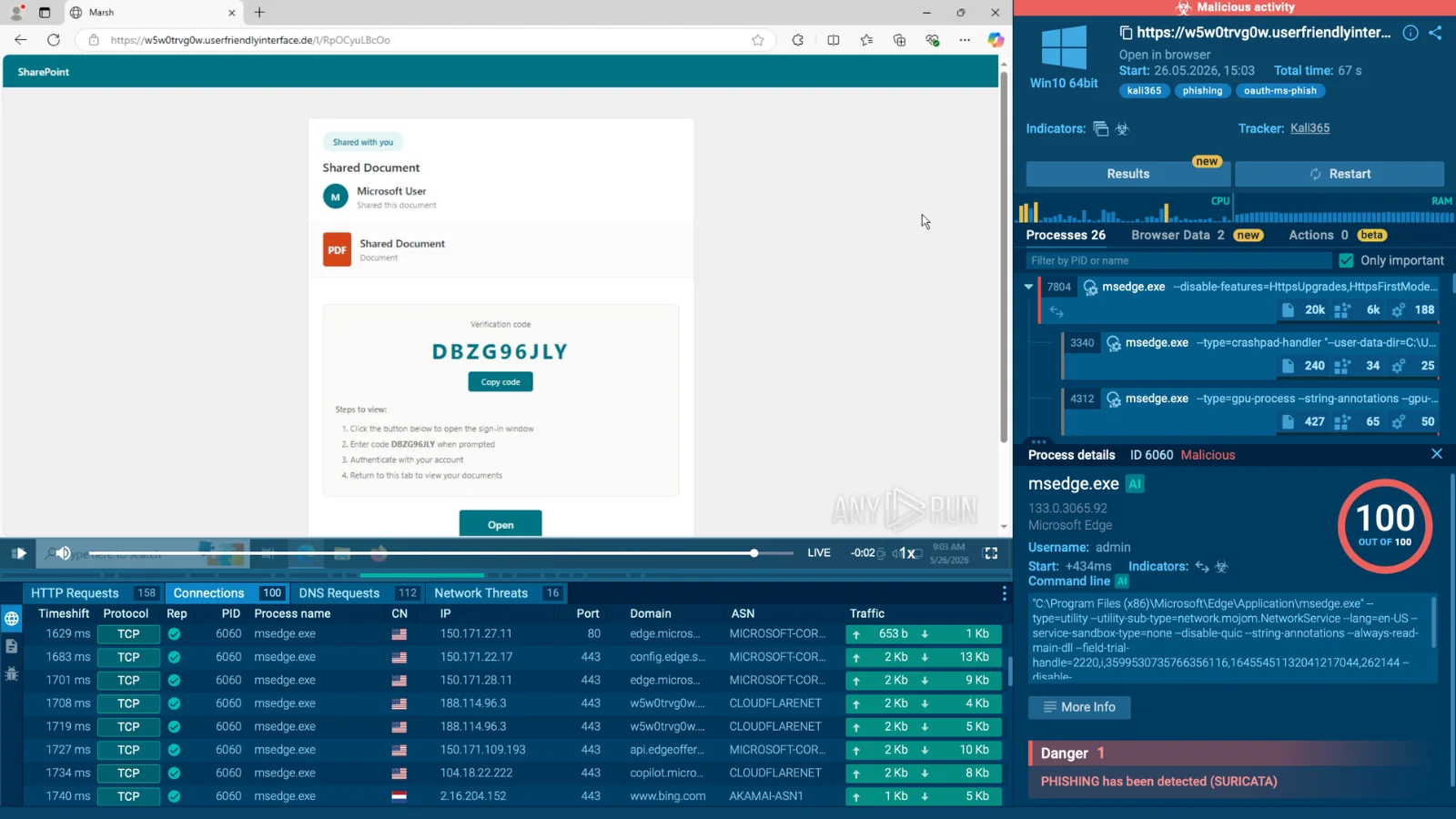
In a typical attack executed in ANY.RUN Sandbox, the victim receives a phishing message containing a lure, often themed around SharePoint or a document-sharing request. The phishing page displays a code and instructs the recipient to visit Microsoft’s device login portal.
The user is then redirected to Microsoft’s legitimate authentication domain, where they enter the supplied code and sign in normally. Because the login page is authentic, traditional warning signs such as suspicious domains, poor page design, or password harvesting forms are largely absent.
Once authentication is approved, the attacker receives OAuth tokens connected to the device code flow. Access tokens enable temporary access to approved resources, while refresh tokens may allow attackers to request new access tokens and maintain access over time.
This makes Kali365 particularly dangerous for Microsoft 365-dependent organizations. Even if the victim later changes their password, a valid refresh token could remain useful until it is revoked or otherwise invalidated.
According to telemetry from malware analysis platform ANY.RUN, Kali365 primarily targets organizations in the United States. The platform has recorded more than 80 public sandbox sessions associated with the phishing kit each week, suggesting sustained and widespread activity.
Observed targeting spans multiple sectors, including:
- Managed security service providers
- Manufacturing companies
- Technology organizations
- Government and public administration
- Healthcare providers
- Consulting firms

The campaign appears designed to target organizations with extensive Microsoft 365 usage rather than focusing on one industry. A successful compromise can expose email communications, internal documents, cloud resources, customer information, and connected SaaS applications.
ANY.RUN also reported that many observed Kali365 phishing pages used the .de top-level domain. While a .de domain does not inherently indicate malicious activity, security teams should investigate suspicious Microsoft 365-related messages originating from unfamiliar domains.

Token-based phishing can lead to significant financial and operational consequences. Compromised Microsoft 365 accounts may be used for business email compromise, invoice fraud, payment diversion, data theft, and internal spear-phishing.
Because the user authenticates on a trusted Microsoft page, the activity may initially look legitimate in security logs. This can delay detection and provide attackers time to search mailboxes, exfiltrate files, establish persistence, or abuse trusted communications with customers and suppliers.
The absence of password theft does not reduce the severity of the incident. Instead, it shifts the attack surface toward identity permissions, OAuth application consent, device sign-in logs, and token management.
Organizations should train employees never to enter a device code supplied through an unsolicited email, chat message, or document-sharing prompt. Users should only use device authentication when they initiated the process themselves and understand why it is required.
Security teams should also monitor Microsoft Entra ID sign-in logs for unusual device code authentication events, unfamiliar applications, anomalous consent activity, and logins from unexpected locations. Conditional Access policies, phishing-resistant MFA, application consent controls, and rapid token revocation procedures can reduce exposure.
Analysts can review the ANY.RUN Kali365 sandbox session and threat intelligence data to identify related infrastructure and potential indicators of compromise.
Make faster, evidence-based security decisions with ANY.RUN. Limit the cost and scope of phishing and malware incidents.