Your TV’s manufacturer doesn’t want you to open this app store
The Play Store on your Android TV or Google TV may look like the whole story. It isn’t. You don’t have to limit your TV experience to what Google has approved for your model and region. You can try almost every app made for Android TV, including those that aren’t available officially. And no, I’m not talking about sideloading apps one by one. You can grab an alternative app store like F-Droid and unlock hundreds of more apps at once.
F-Droid is an open-source app store that doesn’t require an account, is community driven, and only lists apps that don’t have trackers or ads.
The Play Store isn’t your TV’s only app store
It’s time break free

Play Store is a great place for grabbing the best apps for your Android TV, but there’s a big catch. It’s Google who decides what apps are available for your specific model and region. With a third-party app store, you get more choices simply because there are almost no such restrictions.
It’s not just about having more options, though. Privacy is another huge benefit. Every app you download through the Play Store is tied to your Google account and folded into the profile Google builds. That’s not the case with alternative app stores. And since it’s Android under the hood, you have several solid choices too.
Aurora Store is a great option if you want to download Play Store apps without using a Google account. Aptoide TV has its own catalog of over 2500 apps. Its best trick is version control, so if an update breaks something, you can roll back to an older build without jumping through hoops. Uptodown is one to reach for apps that aren’t available in your region.
The one I like the most, though, is F-Droid. It doesn’t try to compete with the Play Store at all. If you’re already an avid Android user, you probably know about it. It’s built for privacy and also fun for exploring apps that aren’t available on the Play Store.
F-Droid unlocks apps I can’t get from the Play Store
It’s all about privacy
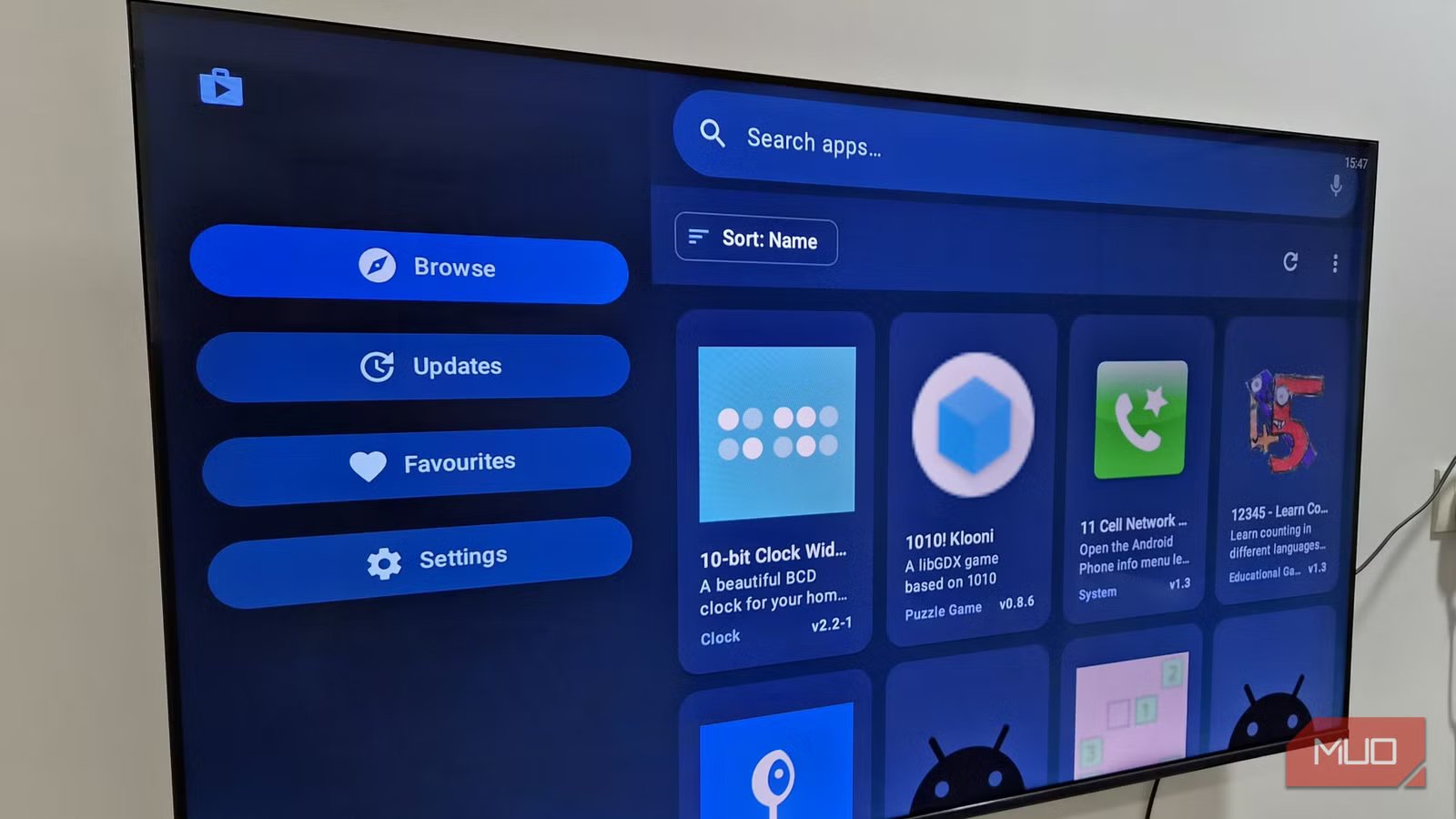
Getting F-Droid on your TV is slightly different from installing it on your phone. You need to download Flicky, which is an F-Droid client built specifically for TV. Once you’ve downloaded its APK file on your phone, transfer it to the TV, and install it as usual. That part isn’t any different from sideloading apps in general.
Once Flicky is installed, you can use it just like the Play Store — search for apps, download the ones you like, and keep everything updated. The big difference is that you won’t need to create an account or worry about privacy.
Now, let’s talk about the fun stuff. There are hundreds of interesting apps on the F-Droid, but a few are absolutely worth trying first. SmartTube is a popular YouTube client built for TVs. It’s completely free, doesn’t show any ads, and has SponsorBlock support. NewPipe is another YouTube client along similar lines. Fennec is a Firefox fork that doesn’t collect any data. So if you want to browse on your TV, it’s worth a shot.
The only thing is Flicky will list the entire F-Droid catalog, so you’ll also see apps that are made only for Android phones and tablets. That part can be annoying, but you’ll get complete privacy while browsing or downloading apps.

- Display Technology
-
QLED
- Refresh Rate
-
240
- FreeSync
-
Yes
- Brand
-
TCL
The TCL Q6 is an affordable 4K Google TV with Dolby Vision and 120Hz gaming support.
You can use it on older Fire TV devices too
Sadly, Amazon is closing the door on this

F-Droid isn’t just for Android TV and Google TV devices. Since Fire TV OS is also powered by Android, F-Droid works there too. You can sideload it pretty much the same way.
The catch is that this only applies to older Fire TV models. Amazon switched to its own VegaOS on newer Fire TV sticks, which doesn’t run on Android, so F-Droid won’t work there. And since all future Fire TV Sticks are said to run VegaOS, there’ll be no more Android or sideloading on new models either.
To be fair, most other smart TV platforms are also fully closed. Samsung’s Tizen OS and LG’s webOS have their own curated stores and that’s where it ends. Roku and Apple TV aren’t much different. The reason is simple. Having a single app store lets your manufacturer decide what’s available, what gets updated, and what gets pulled. Alternative app stores are a threat to that model, which is why most platforms don’t allow them.