Gemini at Unpacked: Google announces major AI updates for foldables, glasses
What you need to know
- Google shared details about a few Gemini updates, which coincide with Samsung’s Galaxy Unpacked reveals.
- Google reiterates Gemini’s presence on Intelligent Eyewear (Samsung collab); however, Galaxy Watch 9 users can raise their wrist to activate the AI, all without saying a word.
- Gemini Notebook is pre-installed on Samsung’s new foldables, but Galaxy Z Fold 8 users can take full advantage of their multitasking capabilities, dragging and dropping content from other apps into the AI notebook.
It’s Samsung’s day, but Google has a few updates to offer users interested in everything revealed at Galaxy Unpacked.
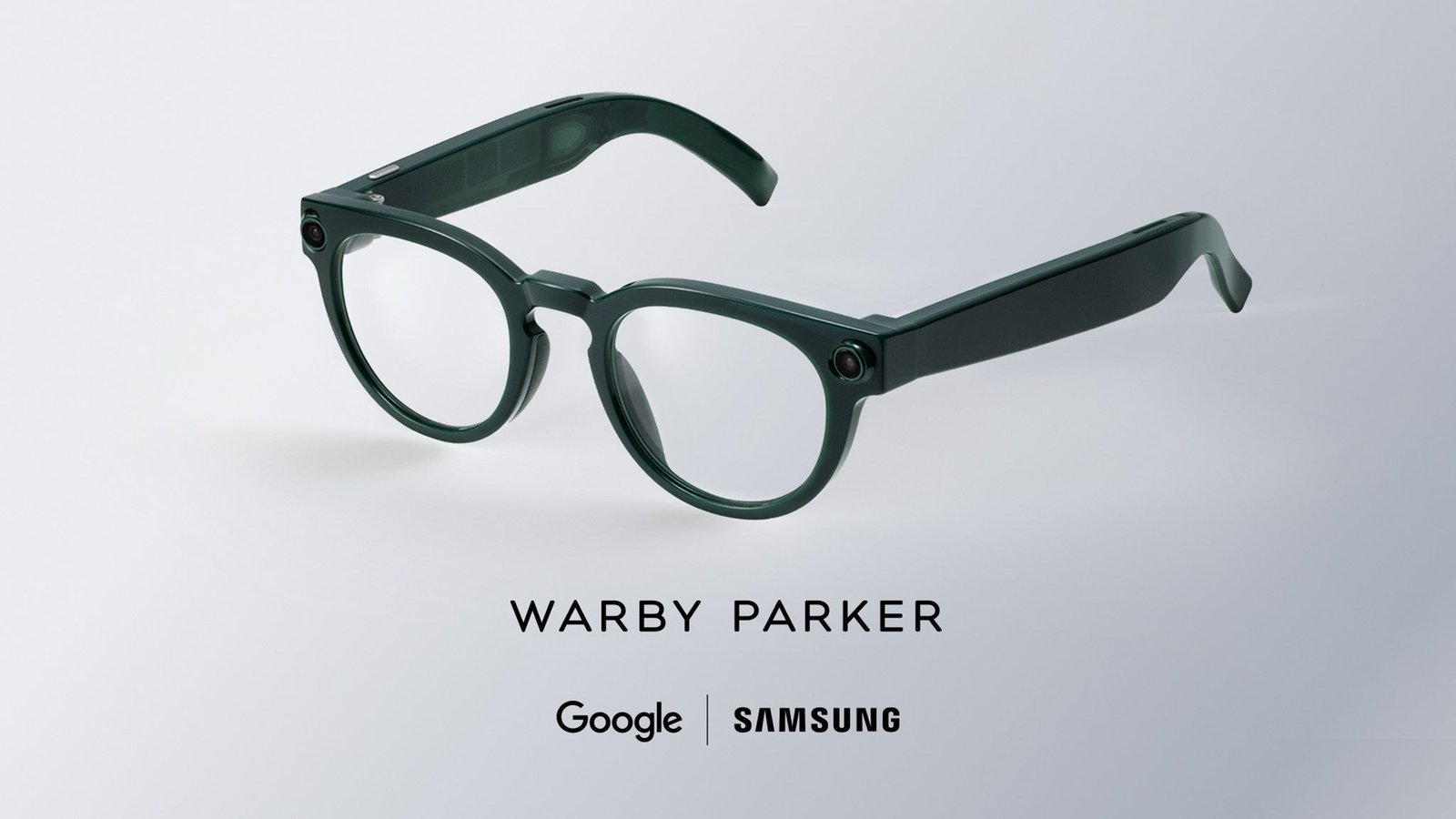
Google shared a press release this morning (July 22), reiterating its recent collaboration with Samsung for Intelligent Eyewear. While the two have joined hands before (primarily for phones), these smart glasses are the next step. Google reminds us that Gemini on Intelligent Eyewear provides helpfulness in a way beyond phones. However, Google’s bringing a little more to Samsung’s new watch. Intelligent Eyewear is also receiving two new frames following Unpacked, which you can view below.
The Galaxy Watch 9 is receiving a little Gemini update for convenience. Google says users need only “raise their wrist,” and the AI will activate. Users don’t have to say “Hey Google” or “Hey Gemini.” Raising your wrist opens its digital ears for your questions or tasks.

Gemini Intelligence continues its round of Galaxy Unpacked updates, as Google introduced a “task automation” expansion. This feature lets users give Gemini tasks that are rather mundane. Tasks like ordering food or items from your favorite online store. Google states task automation is expanding to more than 40 apps. What’s more, this expansion gives Gemini the ability to understand what’s on your screen.
If there’s an item you’ve found, you can ask Gemini to find “something similar” on Etsy or another store, and order it for you. Users can track Gemini’s progress in completing the task you’ve given it, as well. Google says this gives users the chance to cut in and correct anything before handing the task back to Gemini. Of course, any transactions fall solely on the user to complete.
With the Galaxy Z Flip 8’s launch today, users can begin task automation on its Flex Window by long-pressing the power button.
Unpacking Gemini updates

(Image credit: Samsung)


On-device AI continues to advance with an interest in remaining useful. Google announced that Gemini Notebook (previously NotebookLM) is pre-installed on the Galaxy Z Flip 8 and Fold 8. However, it’s the larger sibling—the Galaxy Z Fold 8—that lets users take full advantage of the multitasking. Gemini Notebook can hold pages, videos, and more that you’ve found from other apps while you’re searching.
Google highlights that users can have Chrome open on one side of the Fold 8 and Gemini Notebook on the other. This lets you easily drag and drop before handing off itinerary generation to Gemini. There is a chat function available. Users can chat with Gemini, asking questions about sources and more to create “high-quality” slide decks, videos, quizzes, and more.
One more thing: Samsung and Google introduced a new “native migration experience built directly into Android 17.” The blog post states this lets users “transfer even more data types from an iPhone wirelessly—without downloading a separate app.” Users can transfer photos, videos, contacts, messages, and calendar info. New supported data now includes your Google Account, passwords, Wi-Fi details, and eSIM. Much of this data was mentioned previously by Google’s product lead for Android Onboarding and Android Settings, Paul Dunlop, when discussing what Android 17 would change for Android Switch.
Intelligent Eyewear debuted during Google I/O in May. The glasses, with frames from Gentle Monster and Warby Parker, merged style with technology. Users could talk to Gemini for navigational purposes, order pickups, and photo capture. Samsung joined the discussion, stating users could pair Intelligent Eyewear with their phones for hands-free assistance.
Android Central’s Take
Task automation was already an eye-catching addition when the Galaxy S26 series debuted. To see it now begin expanding to more apps is another thumbs up from me. I like when AI is useful. It’s nice that it continues to walk you through its progress via on-screen notifications (even on your lock screen).
![What’s new in Android’s July 2026 Google System Updates [U]](https://jobssz.com/wp-content/uploads/2026/07/1784645944_google-play-services-1-768x402.jpg)