I added 512GB to my Android phone with a USB-C gadget smaller than my thumbnail
Smartphone storage is a struggle, especially on older models that may feature only 64GB or 128GB of space on-device. In fact, your phone’s official capacity on the spec sheet is different from the actual usable capacity you get in the real world. The Android operating system and system files alone can account for 10GB or 20GB of space, and your Android phone will slow to a crawl if you even get close to filling up your storage. The solution isn’t to pay for cloud storage services like Google Drive or to max out your next phone’s storage configuration at checkout.
Instead, I added extra storage to my phones and laptops using a small USB-C drive, and I’m glad I did. I remember the days when I was lucky to have a 1GB flash drive, but we now live in a world where 1TB flash chips can fit inside a microSD card. The game has changed, and you can add an incredible amount of storage to your phone with a miniscule flash drive that barely inconveniences you. I already tried using a MagSafe SSD to add storage to my Pixel 10 Pro review unit, but this USB-C drive is an even better option.
This drive is small enough to live on your phone
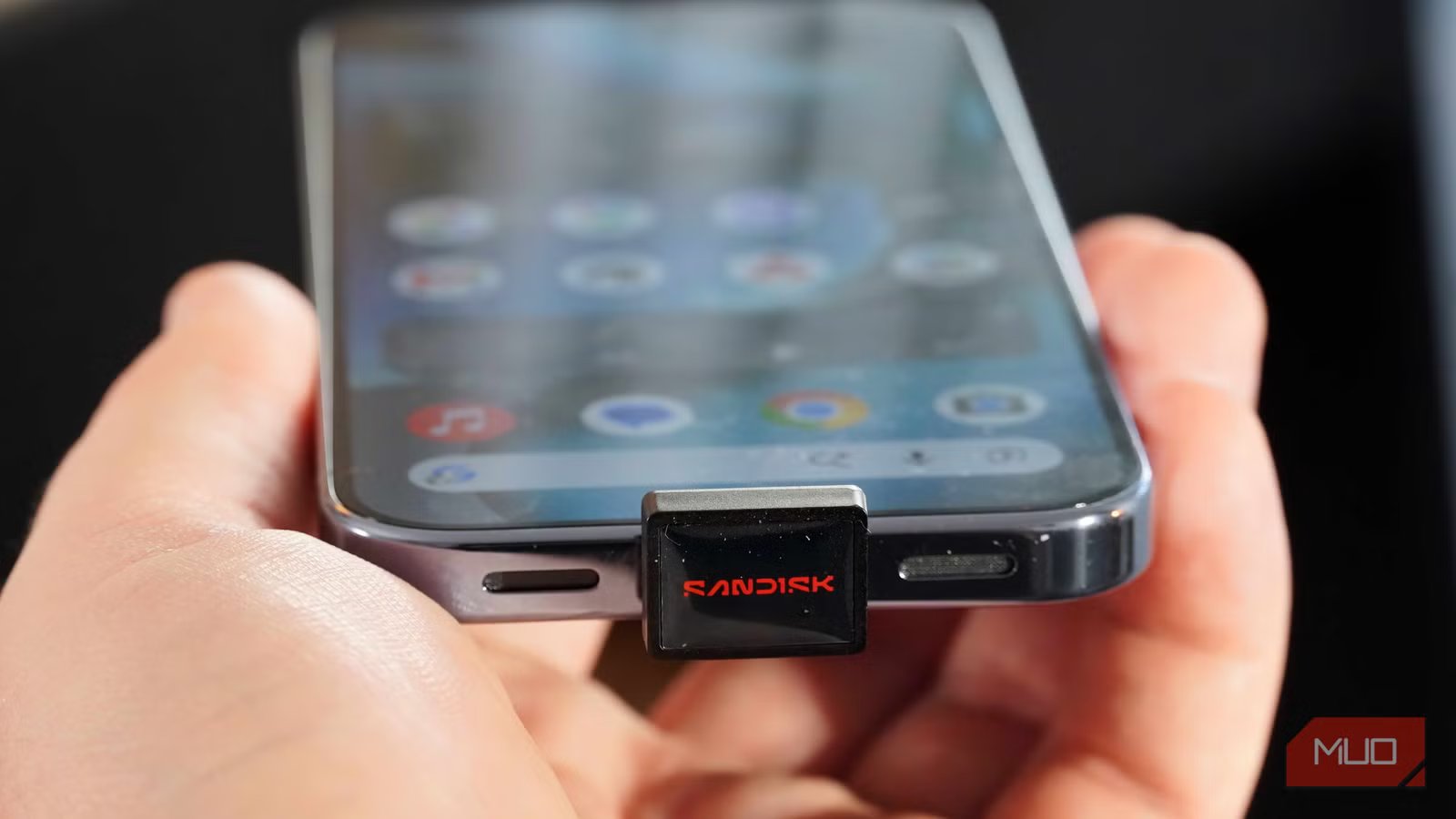
Sandisk’s Extreme Fit USB-C flash drive protrudes no further than a case
The idea of using external flash storage to add more space to your phone isn’t new. The widespread adoption of USB-C allows anyone to easily insert a USB-C flash drive into their phones, with no setup or compatibility checks required. However, this concept is much older than that. You might remember the Sandisk iXpand Memory Case, an iPhone 6 and iPhone 6S case that added up to 128GB of external storage. The problem with these older solutions is that they were clunky and cumbersome.
It’s time to revisit using flash drives to expand your phone’s storage because of their shrinking size. When I first saw the Sandisk Extreme Fit USB-C drive, I thought it’d be a perfect fit for my laptop. After all, laptop storage upgrades are too expensive, and I’d rather use external storage to achieve the same goal. Then, the Sandisk Extreme Fit USB-C drive arrived, and its miniscule size made me realize this logic applies to phones, too.
It’s about the size of my thumbnail, measuring 18.5mm long, 13.7mm wide, and 16mm tall. The Sandisk Extreme Fit USB-C drive feels smaller when it’s inside your smartphone, as the USB-C connector itself accounts for about half of the drive’s length. It disappears after you insert it into your phone’s USB-C port, and suddenly this flash drive is barely noticeable. The 16mm height protrusion gets in the way a bit, depending on the thickness of your phone.
However, I’ve used rugged cases that add more thickness than the Sandisk Extreme Fit USB-C drive, for what it’s worth. This is the smallest USB-C accessory I’ve ever plugged into my phone. I’ve used digital-to-analog converters (DACs), portable SSDs, and SD card readers — they’re all at least twice the size of this USB-C drive. In exchange for that miniature footprint and mere three-gram weight, you get anywhere from 64GB to 1TB of extra space.
That sounds like a fair trade to me, so I bought the 512GB model to use for my laptop, and now my Android phone.
Flash drives are fast enough for storage expansion
Your phone’s USB-C port can’t make the most of high-speed SSDs anyway

If the size of a tiny flash drive doesn’t bother you, the rest of the experience shouldn’t either. Plug in your flash drive into an Android phone’s USB-C port, and it immediately shows up alongside your device’s internal storage. You can read and write to it, and if your flash drive is fast enough, record video directly to it. I like to use USB-C flash drives for long-term storage — think a music library, movie collection, or photo and video gallery.
The Sandisk Extreme Fit USB-C drive is fast enough for these tasks. The latest Android phones from Google and Samsung support USB version 3.2 Gen 1, which can deliver up to 5Gbps data transfer speeds. While your tablet, laptop, or computer might support newer standards like USB4 or perhaps Thunderbolt, phones aren’t pushing the envelope when it comes to data speeds. Adding a high-speed external SSD to your phone might seem like a great idea, but you’ll never realize those speeds.
That’s why the Sandisk Extreme Fit USB-C drive’s USB 3.2 Gen 1 support is a little slow for my laptop, but a perfect match for my phone. It can deliver transfer 1speeds of up to 400MB/s, which is great for moving files. The drive’s sustained write speeds aren’t as good, so if you need to record 4K video directly to an external drive, a portable SSD might be a better fit. For my primary use case — media storage — the capacity and speed are just right. I can fit my lossless music library and other media on this drive, and I couldn’t do it using only my phone’s internal storage.
Wait, what about my USB-C port?
There are viable solutions, but there’s a bigger issue

Unless you’re one of the few ASUS ROG Phone owners out there, you might be thinking that accessories like the Sandisk Extreme Fit drive are a waste of your phone’s only USB-C port. I don’t see it that way. For one, you still have wireless charging to keep your phone powered up while using USB-C accessories. As you can see in the photo above, I have the Sandisk Extreme Fit USB-C drive and a MagSafe charging puck hooked up to a Pixel 10 Pro, and it’s not a bother.
The day-to-day solution is to simply remove a USB-C flash drive when you don’t need it. These drives are meant to be plugged and unplugged as needed, rather than be a permanent solution. If you only need a gigantic media library for travel, leave the Sandisk Extreme Fit USB-C drive at home and only bring it when you need it.
The bigger issue is the price, and truth be told, it isn’t Sandisk’s fault. I ordered the 512GB version of this flash drive in December of last year and only paid $60 for it. Rising component prices ballooned the cost of storage, and the same drive now costs $125. It’s not as good of a deal as it was half a year ago, but it’s not highway robbery either — especially if the alternative is paying for pricey monthly cloud storage subscriptions or buying a new phone.
The takeaway here is that you have options beyond buying phones with exorbitant internal storage configurations or using cloud storage. I’ve tried using portable SSDs with my phones, and now I’ve tested using tiny USB-C flash drives with my phones. Both options are quite compelling when you consider the alternatives.

- Capacity
-
64GB, 128GB, 256GB, 512GB, 1TB
- Speed
-
USB 3.2 Gen 1 (up to 400MB/s)
- Connection
-
USB-C
- Warranty
-
5 years
The Sandisk Extreme Fit USB-C Flash Drive is a compact expandable storage solution for laptop and tablet users. It’s available in up to 1TB storage capacities, comes with a five-year warranty, and works with Windows, macOS, and iPadOS.




![LLM hallucination paper(using math) accepted to ICML workshop[R]](https://jobssz.com/wp-content/uploads/2026/07/3uyvbtoa76dh1.png)