I replaced my $60 Raspberry Pi with a $5 ESP32 and my smart home never noticed
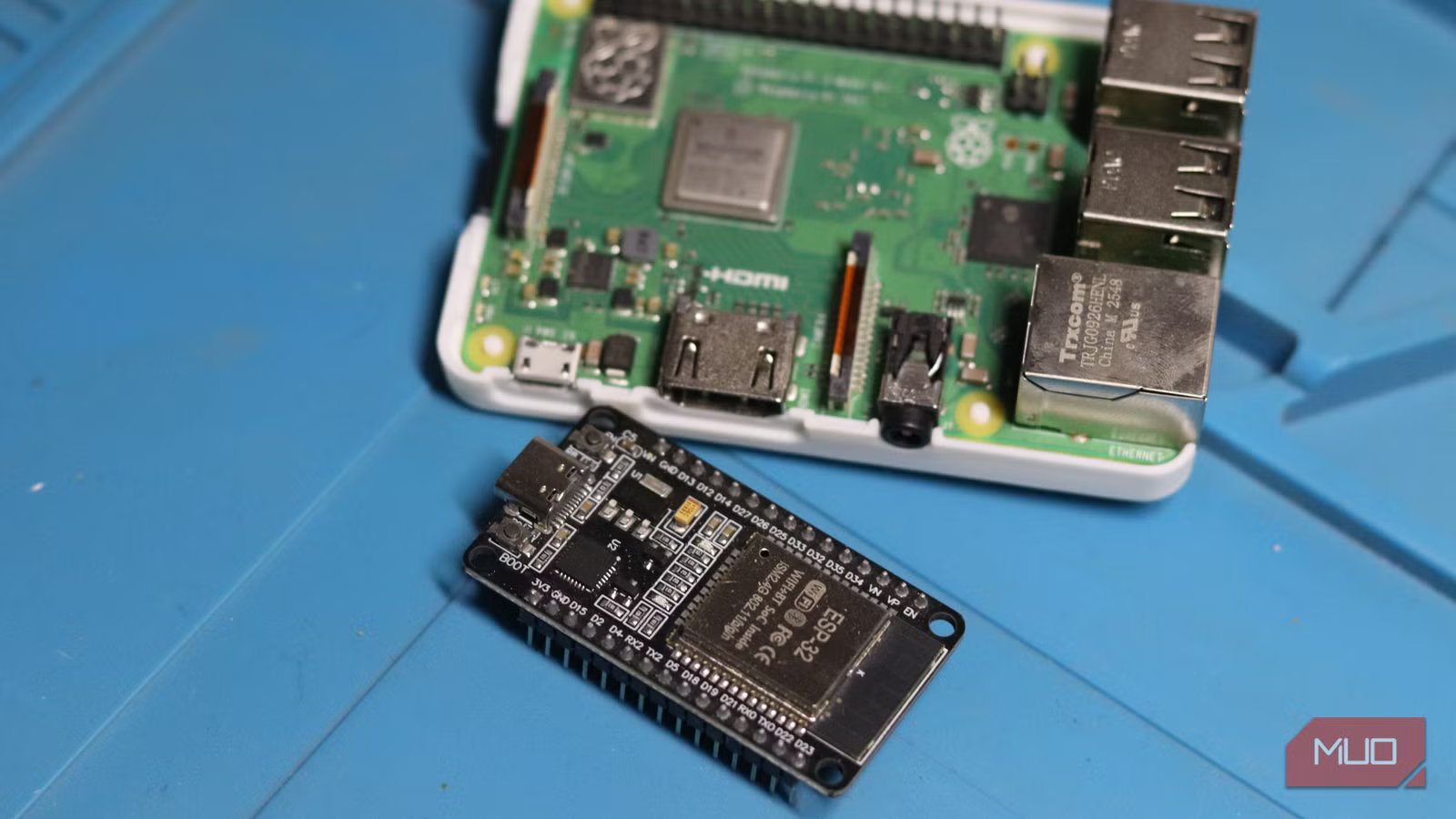
I’ve had a Raspberry Pi 3B+ quietly tucked away reading sensors and reporting back to my Home Assistant server for a handful of automations. It worked, but it was a full Linux computer with a power supply, a case, an SD card, and a cooling fan, all dedicated to something a $5 microcontroller can handle.
There are plenty of things you can build with a $4 chip that outsells the Raspberry Pi, and for good reason. So I swapped my $60 Raspberry Pi out for a $5 ESP32, and my smart home never noticed.
A Raspberry Pi was overkill
My automations never needed that much power
Raspberry Pi boards are brilliant, but they are general-purpose computers designed to multitask, run containers, and juggle several services at once. You can turn your Raspberry Pi into a home server that actually works, and it’ll be a lot more helpful than just polling sensors and occasionally flipping a relay.
An ESP32, by contrast, is a microcontroller. It has no OS to corrupt, no boot sequence to wait through, and no SD card to eventually fail. It wakes up, runs the one program you flashed onto it, and does exactly that until you tell it to otherwise. For a device meant to monitor sensors and take action, a full-blown Linux computer is overkill from day one. The Pi’s real strength is serving as a hub, something powerful enough to run Home Assistant itself, not as a distributed sensor node scattered around a house.
ESPHome made the switch painless
Flash, configure, and forget about it

The actual migration is far simpler than you might think, mostly because of a project called ESPHome, an open source framework that lets you define a device’s entire behavior in a short YAML file instead of writing C++ from scratch. The latest ESPHome update makes YAML almost optional, so creating your own sensor nodes to work with Home Assistant has never been easier.
All you have to do is flash your firmware over USB using a supported browser (Chrome, Firefox, and their derivatives work just fine), and every update after that happens wirelessly over the air. The configuration itself isn’t complicated either. Just a few lines to define Wi-Fi credentials, an API key so Home Assistant can talk to it, and a sensor block pointing at my particular sensors (in this case a DHT22).
Within a couple of minutes of saving that file, the ESP32 rebooted, joined my network, and Home Assistant popped up with a notification discovering the new device. Click “yes”, and the exact same entity that the Pi used to expose is now being served by a board smaller than a matchbox.
Less hardware, same automations
Everything worked exactly as before
Functionally, almost nothing changes from Home Assistant’s perspective. You can match the entity names, and your old automations won’t need any editing at all. Any custom dashboard you might have will also work just fine.
What changed was everything happening below that layer. The ESP32 draws a fraction of the power the Pi did, boots in seconds rather than the better part of a minute, and has no moving parts or storage medium to degrade over time. It also natively supports Bluetooth, and depending on the exact chip variant, protocols like Zigbee, Thread, and Matter without needing a USB dongle — something the Pi needs extra hardware for.
If you’re managing a single hub that runs Home Assistant itself, container stacks, or anything genuinely computational, however, keep the Pi around. That’s exactly the job it was built for. But if your Pi’s entire existence is dedicated to watching a couple of sensors or flipping a few relays, that’s a job description better suited for a microcontroller, not a computer. Pick the tool based on whether you need an OS, not on habit.
Smaller, cheaper, and more reliable
The ESP32 proved to be the better fit
Nothing about my smart home changed except my power bill and patience during SD card failures, both of which improved. The automations fire exactly as before, the sensor readings update on the same schedule, and Home Assistant treats the ESP32 exactly like it treated the Pi, because from its perspective, it’s just another device speaking the same API.
The only adjustment is mental: getting comfortable with the idea that a $5 board with no OS can do a job I had unnecessarily assigned to a $60 computer for longer than I care to admit. Once that clicks, you’ll start star-eyeing every other single-purpose Pi under your deployment with the same skepticism.