Your Windows 11 PC might be hiding a 500GB storage bug – how to check

Follow ZDNET: Add us as a preferred source on Google.
ZDNET’s key takeaways
- A bug in Windows 11 can claim up to 500GB of disk space.
- The culprit is a Windows system file that just keeps growing.
- The bug is fixed in the Windows June preview update and the July update.
Do you have a sneaking suspicion that your Windows PC is losing disk space? If so, it may not be your imagination, at least not if your system has been hit by a known bug.
A particular file in Windows 11 can grow to the point that the loss in disk space becomes noticeable. The culprit here is a system file named CapabilityAccessManager.db-wal, as spotted and described by Windows Latest.
Part of the Capability Access Manager Service, this otherwise obscure file manages the permissions granted to applications to access the camera, microphone, location, and other privacy-minded features. The db-wal extension indicates that this file stores any changes in a write-ahead log before they’re written to the main database.
Also: You can soon restore Windows 11 from scratch even if it can’t boot up – here’s how
The file itself can certainly grow as it needs to keep track of more data. However, it should top out at no more than a megabyte or two. Instead, the bug in Windows seems to cause it to expand to as much as 500GB, according to one Redditor who posted a message a year ago (yep, it’s been around at least that long).
How to tell if you’re affected
How can you tell if you’re affected by this bug? One way is to check the size of your Windows system files.
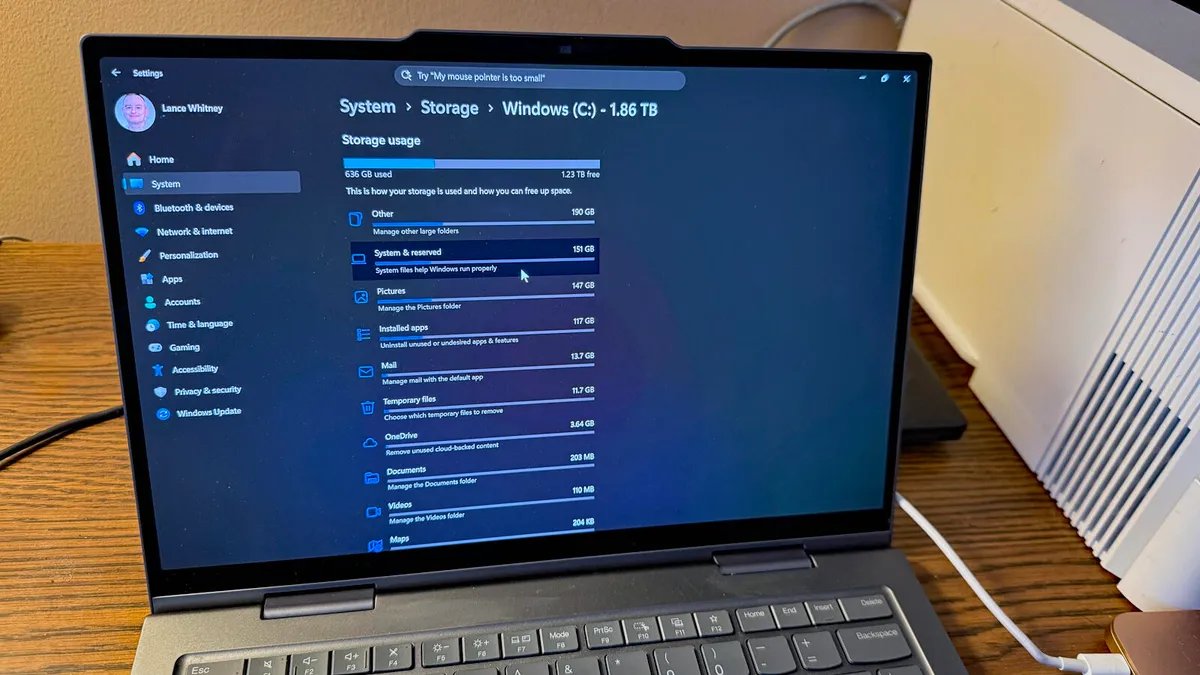
To do that, go to Settings, select System, and then click Storage. Under the first bar image, click the link for “Show more categories.” If the category for System & reserved shows no more than two or three dozen gigabytes, then you’re in the clear. But if it indicates a size that stretches beyond 100GB, then your system is likely affected by the bug.
Also: Too many junk files on your Windows PC? This free tool can remove them in one click
I checked all my Windows 11 environments, including those directly on PCs and those in virtual machines. On all except one, the size for this category ranged anywhere from 5GB to 25GB. But on my primary Windows 11 laptop, the size hit 151GB.
Okay, but how do you know that CapabilityAccessManager.db-wal is to blame for the growth?
The file itself is housed in the following location: C:\ProgramData\Microsoft\Windows\CapabilityAccessManager. However, Windows denies you access to that folder by default, and I don’t suggest changing the permissions on a system folder even if you know how.
Instead, Windows Latest recommends running a utility like WizTree, TreeSize, or WinDirStat in admin mode to view the files in that folder. But there’s an easier option using the built-in Robocopy tool. Open a command prompt as an administrator and type the following string: robocopy “C:\ProgramData\Microsoft\Windows\CapabilityAccessManager” “%TEMP%\CAMCheck” /L /B /R:0 /W:0 /BYTES /NP.
I ran that Robocopy command on my own Windows 11 installations. Almost all reported a size of around 57,000 bytes, or a fraction of a megabyte. But on my primary Windows 11 laptop, CapabilityAccessManager.db-wal weighed in at 7GB, not out of control but still much larger than normal.
How to fix the glitch
Though the bug has been around for at least a year, Microsoft has finally gotten around to fixing it. In the June 23 optional preview update, a note says: “This update improves disk space usage for the CapabilityAccessManager.db-wal file.” That likely explains the difference among my PCs. I’ve already run this preview update in my Windows 11 virtual machines, but not on my laptop.
Also: How to get free Windows 10 security patches until October 2027
If you want to install this one, just head to Settings and select Windows Update. You should see that the 2026-06 Preview Update is available. Just click Download & Install to grab it. But keep in mind that these preview updates are optional for a reason. They’re designed more for IT admins and power users who want to test them ahead of the general release.
The same updates are packaged into the following month’s official Patch Tuesday rollout, which is designed for all Windows users. If you can live with the shot to your disk space, I’d advise waiting until July 14 to grab the entire mandatory update. At that point, this file size bug should be squashed for everyone.