Galaxy Z Fold 8 Ultra: The Best Update Isn’t What I Expected

Samsung Galaxy Z Fold 8 Ultra
Pros & Cons
-
Slender design -
Refined hinge is easier to open -
Inner display is almost crease free
-
Hugely expensive -
Cameras aren’t on par with Samsung’s (cheaper) flagship S26 Ultra -
Battery life has barely improved, despite new tech
Samsung’s Galaxy Z Fold 8 Ultra is a conundrum. On the one hand, it’s so painfully similar to last year’s Galaxy Z Fold 7 that it basically looks like a new color variant. And it also comes with the highest base price we’ve ever seen for Samsung’s foldables outside of the short-lived Z TriFold. On the other hand, there is a scattering of updates across the board that do make a difference to the overall experience.
But fundamentally, those updates come on top of what was already a superb phone. We loved the Galaxy Z Fold 7. It’s one of the skinniest foldables around, it’s packed with power, and the software is great. The new model is standing on the shoulders of the giant that came before it, but I won’t deny I was hoping to see more updates this time around.
The Z Fold 8 Ultra is available for preorder now, starting at a whopping $2,100, making it $100 more than the Z Fold 7. Want the maximum 1TB of storage? That’ll set you back $2,700. Ouch.
The most notable upgrade I’ve noticed is the introduction of a slight lip between the two displays, which makes it easier to pry a finger in and unfold them. Don’t get me wrong, it’s a genuinely welcome change, but it says a lot that this is my favorite upgrade on the 2026 model. Beyond that, the other refreshes are incremental.
 Andrew Lanxon/CNET
The processor has been bumped up to Qualcomm’s latest custom chip, which, as always, provides enough power to do anything you want, while the only real camera updates are a higher-resolution ultrawide sensor. The battery is bigger and uses more modern silicon-carbon technology. Great news, in theory, as other phones have used the tech to pack in more battery capacity. But in practice, the battery life hasn’t really improved since the last model, and other foldables still fare better in this respect, such as the Oppo Find N6.
The Fold 8 Ultra now charges faster, which will be a welcome update for those of you who perpetually forget to charge your phone before a big night out. But again, other rivals offer better performance here, too.
If it feels like I’m being negative, it’s only because I’ve been reviewing phones for 15 years, and a part of me wants to see big changes year on year to keep that excitement going. But the reality is that the Galaxy Z Fold 8 Ultra is a superb phone that’s arguably the pinnacle of what today’s foldable technology can be.
No, it’s not worth an upgrade if you upgraded to last year’s Z Fold 7. But if you’re still using an original Galaxy Fold from 2019 — or even something only a few years old like the Z Fold 4 from 2023 — you’ll definitely appreciate the updates.
What’s with the new Ultra name?
Good question, thanks for asking. The previous version of this phone was simply called the Galaxy Z Fold 7. And while we expected this new model to simply be called Z Fold 8, Samsung actually gave that name to its new model — the one with the wider form factor, which is a little less premium and has a lower $1,900 starting price.

And to differentiate them, it slapped the name “Ultra” on the Z Fold 8.
Refined design
At first glance, the new Z Fold 8 Ultra looks basically identical to the last one. The cameras and buttons are all in the same place, the physical dimensions are essentially the same, and both are IP48 rated for water and dust resistance, making them equally capable of being used in light rain without much worry.
But there are some subtle differences that have a surprising impact. I don’t mean the reduction in thickness from 4.2mm to 4.1mm — honestly, I challenge anyone to truly feel that 0.01mm difference when the phone is in your pocket, unless you’re wearing literally the tightest skinny jeans ever made. In which case, I’d be more concerned about blood flow to your limbs than about how slender your phone is.
No, I mean the refinements elsewhere. The edges are slightly more rounded, making it feel more comfortable to hold versus the quite sharp edges of the Z Fold 7. There’s also a more pronounced bevel running around the edge of the inner display, resulting in a slightly wider gap between the two halves when folded shut.

“So what?”, I hear you ask. Well, that tiny little gap makes the phone much easier to grip and pry open than the last one, and when you might do that 20 or 30 times a day, it’s quite a significant quality-of-life improvement. It’s helped by a redesigned hinge mechanism that’s not quite as stiff, along with less-powerful magnets on each half of the device, keeping them securely together but not locked in a death grip. The overall effect is a phone that really feels like it’s the product of multiple generations of refinement.
That new hinge also pays off for the inner display.
Display and crease
The Z Fold 8 Ultra maintains the same 8-inch inner display as its predecessor, with a 2,256×2,504-pixel resolution. While it looks bright and sharp, colors are ever so slightly more muted than those of its predecessor. The Z Fold 7’s screens have marginally more contrast, giving its colors a bit more pop — especially the reds.
It’s a really slight difference, and I doubt you’d notice unless you happened to be using these two phones side by side, like I was. I tested them with my own YouTube videos, not just because I’m a narcissist and want the extra views, but because I shot and edited them. I know how they’re supposed to look. The Z Fold 8 Ultra arguably looked a little more natural in some scenes, but my own skin tones sometimes looked a little washed out.

On the upside, the 8 Ultra’s inner screen has been given a new anti-reflective coating, which significantly reduces the amount of overhead reflections you see on the display. The result is that it also drastically minimizes perceived ripples from the crease in the middle.
Samsung also says that its redesigned hinge has reduced the appeared of the crease by allowing it to lie flatter when opened. Combined with the new coating, the Z Fold 8 Ultra’s crease isn’t just less visible than its predecessor’s — it’s one of the most invisible-seeming creases I’ve ever seen on a foldable phone.
The 6.5-inch cover display remains the same size and resolution (2,520×1,080 pixels) as its predecessor and is bright, sharp and vibrant. It’s how I mostly interact with the phone, to be honest, only prying it open to use the bigger inner screen for things like gaming or watching videos.
Battery life and fast charging
The Z Fold 8 Ultra packs a 5,000-mAh battery, the largest Samsung has put in one of its foldables. It’s a healthy bump over the 4,400-mAh cell of the last model and uses silicon-carbon technology, which, in theory, makes it more energy efficient.
I say “in theory” because while battery life is better than the Z Fold 7, it’s an incredibly slight improvement. After 1 hour of streaming a YouTube video at max brightness on the cover screen, the 8 Ultra dropped from full to 96% remaining, while the Fold 7 had dropped to 94% in the same test. After the second hour, those numbers fell to 90% for the 8 Ultra and 89% for the Fold 7. Not exactly a significant difference, is it?
For reference, I also tested it against the Oppo Find N6, which went from full to 93% remaining after 2 hours, beating both Samsung phones — though not by much. I also ran the same test using the Z Fold 8 Ultra’s larger inner display, and the numbers were pretty much the same.
 Andrew Lanxon/CNET
So that new battery tech hasn’t exactly led to a revolution in battery life, at least not on our demanding streaming test. In everyday use, the Z Fold 8 Ultra’s battery performs well. After 45 minutes of mixed use (some gaming, some emailing, some photo editing), it dropped 10%, which isn’t great either.
If you do hammer the battery and need to recharge, the good news is that the 8 Ultra now supports 45-watt fast charging, which should take the phone from empty to 63% in around 30 minutes. It’s a welcome boost over the relatively slow 25-watt charging of its predecessor, making it particularly useful for those times when you forget to charge your phone before heading out on a big night. Just a short while on a compatible fast charger (not included, so you’ll need to source your own) will give you a good deal of battery charge back.
That said, Oppo and Honor both offer 80-watt fast charging in their foldable phones, so Samsung continues to play catch-up with its Chinese rivals.
Cameras
The main camera maintains the 200-megapixel resolution of its predecessor, along with the 10-megapixel telephoto camera with its 3x optical zoom. However, the ultrawide has been upgraded from a meager 12 megapixels to a much more generous 50 megapixels. Broadly, this isn’t a huge upgrade to the camera experience.
I took a lot of photos while I was testing the phone in London, and the Ultra performed pretty well across the board. Images are consistently sharp and bright, and while I do find that the image processing works a bit too hard to create an HDR look (think artificially subdued highlights and brightened shadows), the shots are good for everyday snaps.


In low light, the camera performs capably, producing bright shots with sufficient detail. Sure, sometimes motion can be a bit blurry, but that’s par for the course with night-mode shots.


A neat trick in video is the phone’s Super Steady Horizontal Lock mode, which debuted on the Galaxy S26 series. With this activated, you can tilt the phone all the way over, and it will keep the horizon locked and steady. It’s super impressive, and I can only assume it works by cropping the video footage, which essentially allows the frame to ‘spin’ within the sensor area, thereby creating the illusion that it’s staying stable. Certainly, the sensor itself doesn’t spin within the camera unit, so it has to be achieved using software — my pontificating aside, it works simply and effortlessly.
The camera setup on this phone is decent. While it’s probably one of the best you can find on a foldable phone, it’s nowhere near as good as what you’d find on premium non-folding Android phones like the Xiaomi Leica Leitzphone or even Samsung’s own Galaxy S26 Ultra, both of which cost notably less than the Z Fold 8 Ultra. Samsung reserves its ultimate imaging tech for its candybar Ultra phones, and while I get that squashing that sort of hardware into a thin folding body would be difficult — not to mention likely jack the price up even more — it still irks me that these foldables only get a relatively basic camera experience.
The “Ultra” name suggests performance akin to that of the S26 Ultra, but that isn’t the case, at least not when it comes to imaging. Choosing the Z Fold 8 Ultra means making a compromise on the photos you’ll be taking. Considering the phone’s astonishing price, that’s a bitter pill to swallow.
Software and AI additions
The phone runs Android 17 at launch, with Samsung slapping its latest OneUI 9 interface on top. If you’ve used any of Samsung’s recent phones, then everything will be familiar, but it’s still pretty easy to get to grips with if you’ve never touched a Samsung phone before.

Alongside the usual slew of Google AI tricks (like Gemini Live and Circle to Search), there are various new Samsung AI skills for you to play around with, several of which are focused on the camera experience. My FanCam is a new tool that automatically recrops a video to focus on a specific person in the frame, like your kid in a school play.
It’s a neat idea in theory, and I’ve had some success filming clips in crowds and selecting a person to focus on. But there are some limitations. It heavily crops your footage, so you’ll need to shoot the video you plan to crop later in 8K if you want the best results. It also only tracks people (not pets or objects), and I’ve found occasions when it doesn’t recognize a person in a scene and so won’t let me track them.
For me, it’s not a tool I can really imagine wanting to use that often, but I can definitely see the appeal — particularly if you love filming at concerts and want to be able to focus on your favorite member of whatever act you’re seeing on stage.
You can also alter images using generative AI by simply typing in what you want to change in the photo. I tried this with an image I took in London, asking it to turn the overcast scene into a sunset photo. The effect was quite well done, albeit still with that otherworldly “AI look.” As a photographer, I personally despise this sort of AI fakery — if you want a photo of a sunset, go and find a real one.
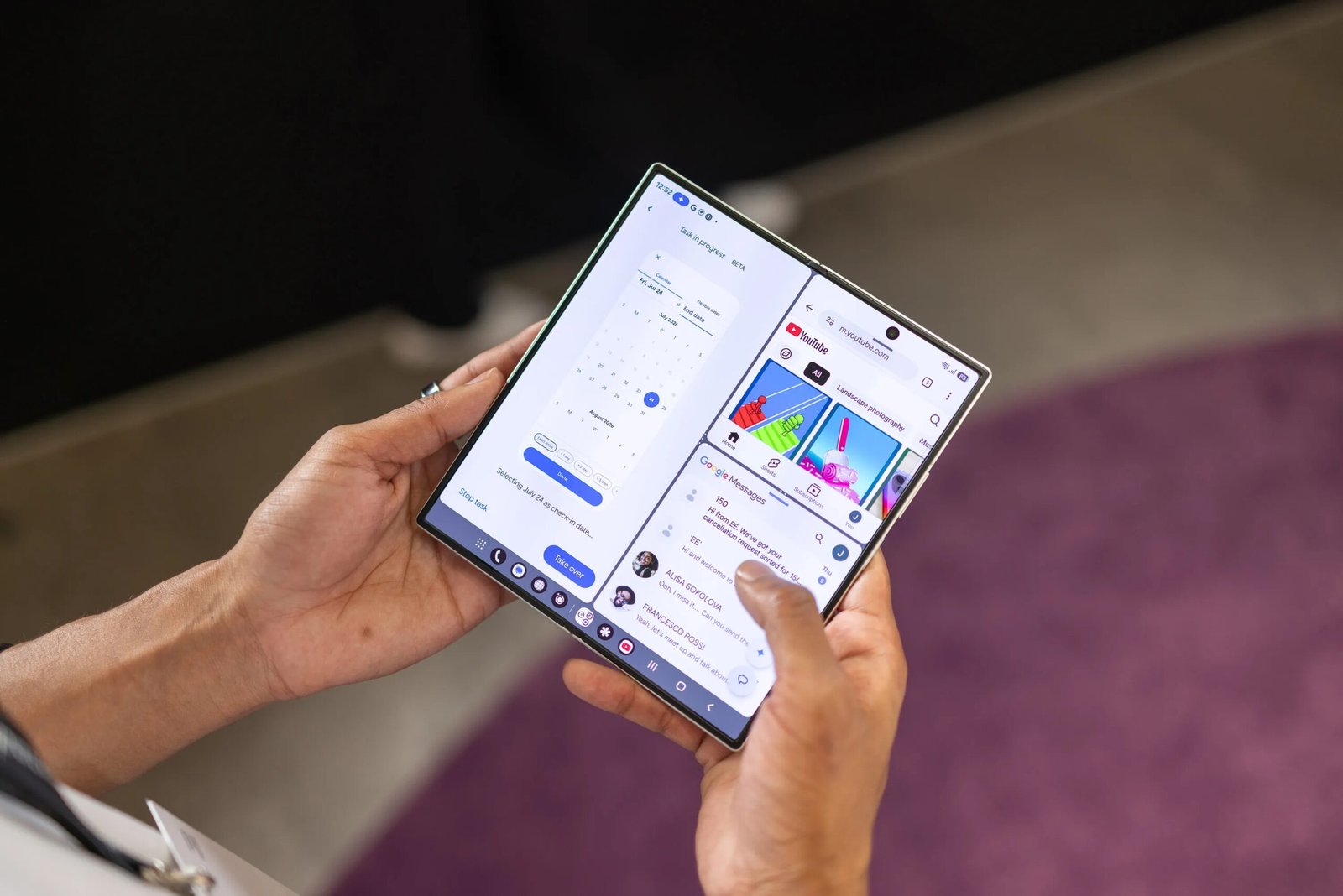
Other non-image AI additions include Now Nudge, which aims to automatically activate multitasking tools based on what’s on screen, such as surfacing the calendar when messaging your friend about an upcoming event. I say “aims” as it hasn’t popped up to offer any help in my testing time so far, so I guess its actual usefulness might only become apparent when you live with the phone for a longer period of time.
 Andrew Lanxon/CNET
You’ll find task automation tools, too, which use agentic AI to perform duties such as booking concert tickets or local tours for you. Samsung says there are over 40 supported apps that the agentic AI can use, and you can take over control at any point in the process.
I remain pretty ambivalent about these kinds of AI tools on my phones. It’s not that I don’t like them — although I am skeptical about giving control of my money to an AI system — it’s just that I haven’t found an application that’s had a meaningful impact on my life. These tools seemed interesting in my demos, but nothing really stood out to me as life-changing when I used the phone for days on end.
These AI features are also available on Samsung’s other new foldables, the Z Flip 8 and Z Fold 8, and will likely roll out to Samsung’s Galaxy S26 phones as well. I’m going to continue to try them out as I test the phone over the coming months, and I’m genuinely interested to see how useful I find them.
The phone runs Qualcomm’s latest Snapdragon 8 Elite Gen 5 for Galaxy chip. It’s a custom-made processor that, as Qualcomm told CNET during the Unpacked event, is specifically tailored for Samsung’s phones to deliver both better performance and better efficiency. I certainly found the phone extremely capable in everyday use, with navigation feeling buttery smooth and demanding games like Genshin Impact playing at max settings with high frame rates.
However, the phone has blocked me from installing any of our usual benchmark tests (a pretty common thing when we test phones before launch), so I’ll have to wait for this restriction to be lifted before I can see how it truly stacks up against the competition.

Galaxy Z Fold 8 Ultra: Should you buy it?
I can say with absolute confidence that if you already own the Galaxy Z Fold 7, you certainly do not need to upgrade to the new model. The design, specs and overall performance are so similar that you’ll see almost no benefit.
However, if you’re looking to upgrade from an older Fold model or even get your first foldable phone, the Z Fold 8 Ultra has plenty to offer. It’s slender, powerful, charges swiftly, and the cameras are good enough for most casual photography. Sure, there are phones like the Honor Magic V6 or the Oppo Find N6 that have better specs, but you can’t buy them in the US, so your options are slightly more limited.
Ultimately, the Z Fold 8 Ultra’s biggest rival is simply its predecessor. It’s comparable in most ways, especially physically, and as the last generation model, you may well find some good shopping deals as stores and carriers try to shift older stock. You may even find some good deals on the used market. It’s worth keeping an eye out.